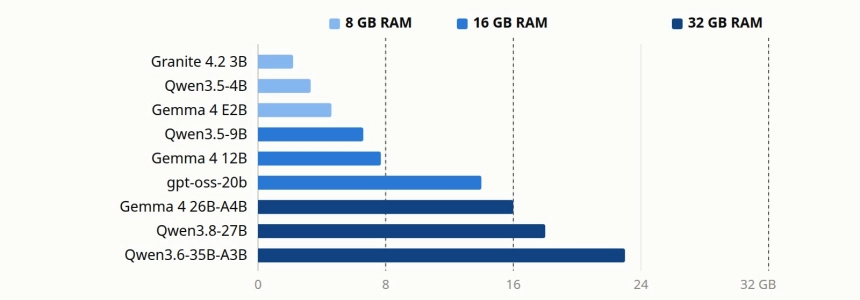
You no longer need a graphics card to run a decent language model on your own computer. The short answer, as of November 2026: with 8 GB of RAM, install Qwen3.5-4B; with 16 GB, Qwen3.5-9B or Gemma 4 12B; with 32 GB, a mixture-of-experts model such as Qwen3.6-35B-A3B or Gemma 4 26B-A4B, which are much faster on a CPU than their size suggests.
We have not benchmarked these models ourselves. This guide brings together what the makers publish, the independent rankings and the few third-party measurements on ordinary processors, and it tells you which is which. Model names, sizes and download tags were checked on 18 and 19 November 2026.
How to tell whether a model fits in your RAM
Local models are usually downloaded as GGUF files, compressed ("quantized") to fewer bits per weight. The most common format, Q4_K_M, uses about 4.9 bits per weight, so the file weighs roughly the number of parameters × 4.9 ÷ 8. For a 9-billion-parameter model that gives about 5.5 GB, and the real Qwen3.5-9B file weighs 5.63 GB.
Then you have to add two things:
- The program itself, which takes between 0.3 and 0.6 GB on top of the model, according to measurements with llama.cpp.
- The context, that is, the memory where the model keeps the conversation (the KV cache). It grows with every token: in Qwen3.5-4B and 9B, a 32,000-token conversation adds about 1 GB.
A sensible rule, taken from a November 2026 guide by vdf.ai: the model file should not take more than 60% of the RAM on 8 and 16 GB machines (about 4.8 and 9.6 GB) or 75% on a 32 GB machine (about 24 GB). The operating system, the browser and the integrated graphics share the same memory.
One trap catches almost everyone: mixture-of-experts (MoE) models take up space according to their total parameters, not the active ones. Qwen3.6-35B-A3B only uses 3 billion parameters per token, but all 35 billion must be in RAM, because the next token can need any of the experts.
Why speed depends on memory, not on cores
To generate each token, the processor has to read all the active weights from RAM. That is why speed depends above all on memory bandwidth. A dense 27-billion-parameter model reads 16 to 18 GB per token at Q4; an MoE with 3 billion active parameters reads about 2 GB.
The difference is huge in practice. On a virtual server with a 16-core Ryzen 9, 32 GB and Ollama, arct.cloud measured 15.7 tokens per second with Qwen3.6-35B-A3B and only 2.4 with the dense Qwen3.5-27B: the MoE was six times faster. On the same machine, Qwen3.5-4B ran at 13.4 tokens per second and Qwen3.5-9B at 7.8. A virtual server has more bandwidth than a typical laptop, so treat these figures as an upper bound.
For ordinary PCs there are only estimates. These are vdf.ai's, which the source itself presents as theoretical ceilings, not measurements:
| Memory (dual channel) | Qwen3.5-4B | Qwen3.5-9B | gpt-oss-20b (MoE) | Dense 27B |
|---|---|---|---|---|
| DDR4-3200 | ≈11 tok/s | ≈5 | ≈9 | ≈2 |
| DDR5-5600 | ≈20 | ≈10 | ≈15 | ≈3 |
| LPDDR5x-8533 | ≈30 | ≈15 | ≈23 | ≈4 |
Two practical consequences. With a single RAM module instead of two, speed drops by half, so dual channel matters more than the number of cores. And the integrated GPU helps mainly to read the prompt, not to write: Google measured Gemma 4 E2B on an Intel Lunar Lake laptop reading 435 tokens per second on the CPU and 3,751 on the integrated GPU, but generating 29.8 and 48.4 respectively. For coding agents, which send whole files, that faster reading is worth a lot.
What to install with 8, 16 and 32 GB
Sizes are the downloads listed in the Ollama library on 19 November 2026; for multimodal models they include the vision component.
| RAM | Use | Model | Download | Ollama tag |
|---|---|---|---|---|
| 8 GB | General use | Qwen3.5-4B | 3.3 GB | qwen3.5:4b |
| 8 GB | With audio input | Gemma 4 E2B | 4.6 GB | gemma4:e2b |
| 8 GB | Text only, Spanish and Italian tested | Granite 4.2 3B | 2.2 GB | granite4.2:3b |
| 8 GB | Code autocomplete | Qwen2.5-Coder 1.5B | 1 GB | qwen2.5-coder:1.5b |
| 8 GB | Reading documents (OCR) | GLM-OCR | 2.7 GB | glm-ocr |
| 16 GB | General use and reasoning | Qwen3.5-9B | 6.6 GB | qwen3.5:9b |
| 16 GB | Images and audio | Gemma 4 12B | 7.7 GB | gemma4:12b |
| 16 GB | Fast reasoning (tight fit) | gpt-oss-20b | 14 GB | gpt-oss:20b |
| 16 GB | Code autocomplete | Qwen2.5-Coder 7B | 4.7 GB | qwen2.5-coder:7b |
| 32 GB | General use, code and reasoning | Qwen3.6-35B-A3B | 23 GB | qwen3.6:35b |
| 32 GB | More free memory | Gemma 4 26B-A4B | 16 GB | gemma4:26b |
| 32 GB | Code autocomplete | Qwen3-Coder-30B-A3B | 19 GB | qwen3-coder:30b |
| 32 GB | Maximum quality, if you can wait | Qwen3.8-27B | 18 GB | qwen3.8:27b |
The models, one by one
Qwen3.5-4B and Qwen3.5-9B
Alibaba released the small Qwen3.5 models at the beginning of 2026 under the Apache 2.0 licence. They accept images, call tools, have a 262,000-token context and a reasoning mode you can switch on and off. In March, Artificial Analysis rated them the most intelligent models under 5 and under 10 billion parameters (27 and 32 points on its index at the time).
The same analysis also measured their weak point: in its knowledge test they hallucinated 80% (4B) and 82% (9B) of the time. Use them to write, summarise, translate or work on a document you give them, not as an encyclopedia. And turn reasoning off for normal chat: some users see the 4B thinking for a while even before answering "hello".
Gemma 4: E2B, E4B, 12B and 26B-A4B
Google released Gemma 4 in April 2026, and for the first time under Apache 2.0 (up to Gemma 3 it used its own terms). The names of the small ones are misleading: the "E" stands for effective parameters, and with their embedding tables the files contain 5.1 and 8 billion parameters. In Ollama they weigh 4.6 and 6.6 GB.
Their strong point is audio: E2B, E4B and 12B accept voice clips of up to 30 seconds, something no other small model from a big lab offers. In raw quality they fall behind Qwen at the same size. Gemma 4 12B, released on 3 June 2026, handles images, audio and video without a separate encoder and is the 16 GB alternative to Qwen3.5-9B; we have written about building multimodal apps with it. Gemma 4 26B-A4B is an MoE with 3.8 billion active parameters which, in Artificial Analysis's April comparison, used fewer tokens than its rivals for similar results.
gpt-oss-20b
OpenAI's open model dates from August 2025 and is still on every list because there is no successor. It is an MoE with 21 billion parameters and 3.6 billion active, Apache 2.0, which takes 14 GB in Ollama. It lets you choose the reasoning effort (low, medium or high) and works well with tools, but it only accepts text and needs its own conversation format, called harmony. In 16 GB it fits only if you close almost everything else. In reasoning it has fallen behind: its own figures on the GPQA science test (between 59 and 67, depending on the effort) are below the 81.7 that Qwen publishes for Qwen3.5-9B.
Qwen3.6-35B-A3B
If you have 32 GB, this is the model to try first. Released in April 2026 under Apache 2.0, it has 35 billion parameters but only 3 billion active, accepts images and is the one that gave 15.7 tokens per second in the CPU measurement above, with a peak of 22.9 GiB (about 24.6 GB) at 8,000 tokens of context. It is a tight fit: close the browser before loading it. Qwen publishes 73.4 on SWE-bench Verified, a test of fixing real bugs in software projects; with another test harness, Krafton measured 63.2. Benchmarks depend a lot on who runs them.
Granite 4.2 3B and 8B
IBM's Granite 4.2 (25 August 2026, Apache 2.0, cryptographically signed weights) only handles text, but it is the only family here that explicitly names Spanish and Italian among the languages it was evaluated in. It offers three modes: with reasoning, without it or with low effort. For a text assistant in those languages it deserves a test next to Qwen.
The dense 27–31B models: they fit, but they do not run
Qwen3.8-27B (August 2026), Gemma 4 31B and Meta's Muse Glimmer 30B (August 2026, Apache 2.0 plus a use policy, Meta's first open model since Llama 4) are the most capable models that fit in 32 GB: their Q4 files weigh 17 to 20 GB. Qwen3.8-27B publishes the best scores of the group, such as 89.2 on GPQA Diamond, and reasons at maximum effort by default.
The problem is speed. Being dense, on a PC without a graphics card they run at 2 to 4 tokens per second according to estimates, and the only measured dense 27B gave 2.4. With reasoning on, a single answer can take many minutes. They make sense on a Mac with unified memory (Meta reports 23.7 tokens per second for Muse Glimmer on an M4 Max) or for leaving a hard question running and coming back later.
Programming: autocomplete and agents need different models
Code completion in the editor (FIM, fill-in-the-middle) needs a small model without reasoning, trained to fill gaps. For that, Continue's documentation still recommends Qwen2.5-Coder 1.5B and 7B, and warns that chat models, even larger ones, usually do badly at it. With 32 GB, Qwen3-Coder-30B-A3B supports FIM and has no reasoning mode.
Agents such as Cline, OpenCode or Continue in agent mode need the opposite: reasoning and reliable tool calls. The practical choices are Qwen3.5-9B with 16 GB and Qwen3.6-35B-A3B with 32 GB. Devstral Small 2 from Mistral (68.0 on SWE-bench Verified, according to Mistral) is designed for these tools, but it is a dense 24B model and slow without a graphics card.
All the coding scores above come from the makers, and the only independent coding table we used to follow, Aider's, has not been updated since November 2025. Compare models within the same table, never across different model cards.
Reasoning: the hidden cost on a CPU
Reasoning models write their thinking before answering, and that costs time. Qwen recommends reserving 32,768 output tokens for most questions and 81,920 for hard maths or programming. At 10 tokens per second, which is what Qwen3.5-9B gives with DDR5 according to the estimates, 3,000 tokens of thinking take about five minutes, and the full 32,768-token budget almost an hour.
The good news is that strong reasoning already fits in 16 GB: Qwen publishes 92.5 on AIME 2026 and 81.7 on GPQA Diamond for Qwen3.5-9B. The practical advice: for live work, an MoE with 3 or 4 billion active parameters and reasoning on low or off; high effort only for questions you can leave running.
Images and OCR
The only independent comparison of small vision models we found is a test with 30 images published on r/LocalLLaMA in June 2026. Qwen3.5-4B scored 75.5 and was the best value per gigabyte; Qwen3.6-35B-A3B reached 76.4 and Qwen3.6-27B 79.6, the best overall. It also left three tips: reasoning makes vision worse (all Qwen models scored higher with it off), Gemma 4 needs a larger image token budget than the default to read small text, and the highest quantization does not always win.
On a CPU, the slow part is encoding the image, not writing the answer: count on tens of seconds per screenshot. On one AMD processor, moving the image encoder from the CPU to the integrated GPU cut that time from 39.8 to 10 seconds.
To read documents in bulk, a small specialist is better. The llama.cpp team documents support for OCR models such as GLM-OCR, DeepSeek-OCR, dots.ocr and PaddleOCR-VL, and you can start one with a single command:
llama-server -hf ggml-org/GLM-OCR-GGUFIf you want to use Qwen with images, use llama.cpp or LM Studio: sources disagree on whether Qwen3.5 and 3.6 vision works in Ollama.
Licences: almost everything is free, with exceptions
Practically every model in this guide is Apache 2.0 or MIT, so you can use it commercially: Qwen3.5, Qwen3.6, Qwen3.8-27B, Gemma 4, gpt-oss, Granite 4.2 and the Ministral models. Muse Glimmer adds a use policy that excludes under-18s. The exceptions worth knowing:
- Liquid AI (LFM2.5, LFM3): its LFM Open License only allows free commercial use for companies with less than 10 million dollars in annual revenue.
- EXAONE 4.5 from LG: non-commercial licence.
- HunyuanOCR from Tencent: its licence does not apply in the European Union, the United Kingdom or South Korea.
- Alibaba's largest Qwen models are closed or carry licences with revenue conditions, but the sizes in this guide are Apache 2.0.
Which program to use
- LM Studio: the most comfortable graphical interface on Windows and Mac. It is closed source but free for work use since July 2025.
- Jan: the open source alternative (MIT) with a graphical interface.
- llama.cpp: the engine underneath almost everything. It reached version 1.0 on 13 November 2026, with a stable API and support for more than 150 model architectures. New models arrive here first, and
llama-serverincludes a web chat. - Ollama: the easiest to integrate with other apps and the one with the most ready-made tags. In 2026 it was heavily criticised for hiding for a long time that it was built on llama.cpp and for a closed-source desktop app.
With Ollama, watch out for two things. First, always write the size: ollama run qwen3.5 downloads the 9B (6.6 GB) and gemma4 the E4B (6.6 GB), too much for an 8 GB machine. Second, without a graphics card it limits the context to 4,000 tokens, so long documents are cut without warning; you can raise it with the num_ctx parameter, knowing that it uses more RAM.
ollama run qwen3.5:4b
llama-server -hf unsloth/Qwen3.5-4B-GGUF:Q4_K_M
Two you can forget: GPT4All has not released a version since February 2025, and Intel archived IPEX-LLM in January 2026.
Download only from trusted sources
A model file is not just data. In April 2026, CVE-2026-5760 (severity 9.8 out of 10) showed that the SGLang server could execute code hidden in the chat template of a model. Among the trending files on Hugging Face there are also plenty of modified "uncensored" copies of popular models. Download from the official library of your program or from known quantizers: ggml-org, unsloth, bartowski and lmstudio-community.
What nobody has measured yet
There is no published CPU benchmark of the 32 GB MoE models on a named desktop processor, and no 2026 comparison of these models in Spanish or Italian. The makers' figures (Qwen claims 201 languages, Gemma 4 more than 35 ready to use) say little about how they write in your language. Before choosing, try two or three candidates with your own texts: with the commands above, it takes an afternoon.
And if you also want your computer to speak, read our tests of free text-to-speech engines you can install locally.