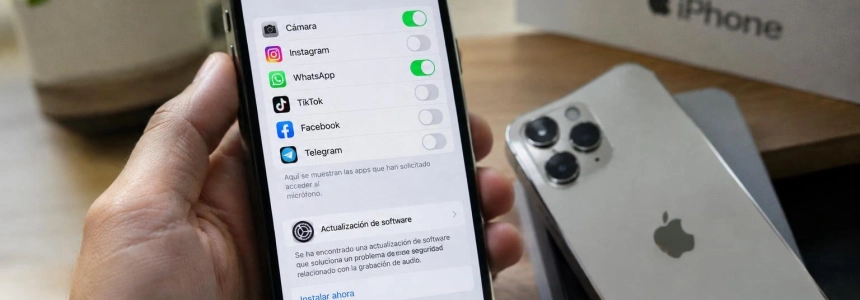
Researchers from Meta Red Team X and security engineer Mustafa Calap detailed CVE-2026-65339, a flaw that allowed an installed app to record audio on iPhone or iPad even after the user tapped “Don’t Allow” in the microphone prompt. In some tests, the orange indicator also did not turn on; Apple released patches, and no attacks exploiting the flaw have been described.
Check your model and installed version
The issue required the app to already be installed. Calap reproduced it on iOS 26.6 and an iPadOS 27 beta; in his tests, recording had to begin while the app was in the foreground. It could then continue in the background and while the device was locked. The two test prototypes were installed from Xcode and did not go through App Review, so they do not establish how Apple’s review process would have responded to an app distributed to the public.
On an iPhone or iPad, open Settings > General > Software Update. There you can check the installed version and whether an update is pending. Compare the version with the row that applies to your device; do not rely only on the model name or on having updated the system at some other time.
| Device or system | Version that fixes the flaw |
|---|---|
| iPhone 11 and later; iPad Pro 12.9-inch (3rd generation and later), iPad Pro 11-inch (1st generation and later), iPad Air (3rd generation and later), iPad (8th generation and later), and iPad mini (5th generation and later) | iOS 26.6.1 or iPadOS 26.6.1, released on August 17 |
| iPhone XS, XS Max, and XR; iPad (7th generation) | iOS 18.7.11 or iPadOS 18.7.11, released on October 26 |
| Mac | macOS Tahoe 26.6.2 or macOS Sequoia 15.8 |
| Apple TV 4K (2nd generation and later), Apple Watch Series 9 and later, and Apple Vision Pro | tvOS 27, watchOS 27, and visionOS 27, respectively |
The vulnerability was not limited to iPhone and iPad: Apple also released fixes for Mac, Apple TV, Apple Watch, and Vision Pro. The table lists the versions specified for each product; for Mac, the fixes mentioned are for Tahoe and Sequoia.
Install the appropriate patch
Identify your device in the list. If you have one of the older models listed, look for branch 18.7.11; for the newer models listed, the iOS or iPadOS fix is 26.6.1. Apple’s list for iOS 18 includes iPhone XS, XS Max, and XR, as well as the 7th-generation iPad.
Look for the update in Settings. On iPhone and iPad, go to Settings > General > Software Update. If an update is available, install the one for your device. Apple identifies CVE-2026-65339 in the iOS 18.7.11 and iPadOS 18.7.11 notes as an Audio issue fixed with improved checks.
Verify the version after updating. Return to Software Update and confirm that the device shows at least the fixed version for its branch: 26.6.1 or 18.7.11, depending on the model. Versions released after those fixes also include the patch, according to the published update information.
Update your other affected Apple devices. For Mac, the versions listed are macOS Tahoe 26.6.2 and macOS Sequoia 15.8. For Apple TV, Apple Watch, and Vision Pro, they are tvOS 27, watchOS 27, and visionOS 27. Updating an iPhone does not, by itself, fix your other devices.
Treat information about iOS 27 with caution. Meta places the fix in iOS 27.0 beta 5, but the release notes for public versions of iOS 27 do not list CVE-2026-65339. This omission does not prove that the system remains exposed: Apple may have included the fix without mentioning it in those notes. Keep your device updated, and do not use the release notes as the sole proof that it is vulnerable or fixed.
Review permissions, but do not confuse them with the patch. You can continue to deny microphone access to apps you do not want to grant it to. However, while the flaw was present, that decision did not prevent the vulnerable audiomxd path from capturing audio. Apple’s fix—not changing the permission—is what closes the issue.
Which signs are useful and which are not
The orange indicator is not a way to check retrospectively. In an early build analyzed by Tsytsarkin, it stayed off while the app was recording, and the logs attributed the activity to the audio service, not the app. In a later build used for Meta’s demonstration, the indicator did appear. Therefore, the orange light cannot reconstruct what happened during the vulnerable period.
The same applies to microphone permission: seeing it listed as denied confirms the state visible to the user, but does not prove that an app could not exploit the flaw. None of the researchers describes a feature or setting that would let you know whether an app recorded before the patch was installed. Nor should you infer that a recording took place simply because an app is present.
The vulnerability was limited to microphone capture through the audio service. It did not grant the app other privacy permissions. CISA assigned it a CVSS score of 5.0 out of 10, and its Known Exploited Vulnerabilities catalog did not include it in the update cited by The Hacker News. Apple and the researchers also reported no use in attacks.
Mistakes to avoid
Do not rely only on having tapped “Don’t Allow.” That action did not stop recording on affected versions. You do not need to change that choice if you want to keep microphone access denied, but it is no substitute for installing the update.
Do not use the indicator to detect past activity. Its behavior depended on the build tested; in one of them, it did not turn on during recording. Being off does not rule out the flaw, and turning on in a later version does not let you conclude that an app recorded earlier.
Do not conclude that you were spied on just because your device was exposed. The analyses describe a technical capability and tests with the researchers’ own apps; they do not document real-world attacks. In addition, Calap did not check whether App Review would have blocked such an app. Keep your conclusions to what you can verify: the model, the installed version, and whether the patch has been applied.
The practical step is to check which version each device is running and update it to the applicable fix. If a device is still on an earlier branch, denying permission is not an alternative to the patch.
Sources: The Hacker News, Meta Red Team X, Apple Support, PrivacyAffairs