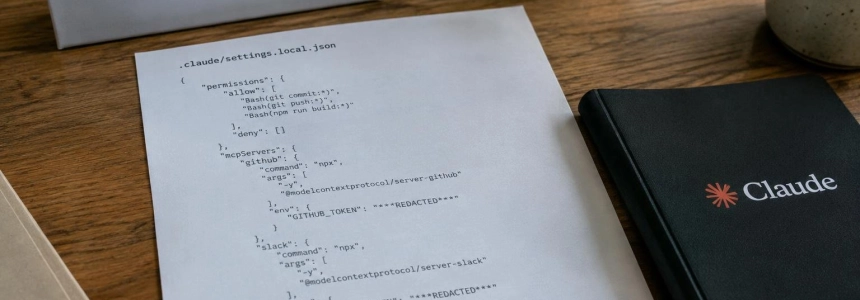
When you approve a command with “Yes, and don’t ask again”, Claude Code may save its entire text as a permanent rule in .claude/settings.local.json. If the command contained an API key, password, or token, the secret could end up in a public repository or Docker image. Apiiro found 1,122 secrets in these files and another 1,160 in Git histories, shared files, and transcripts; GitGuardian detected 31,088 secrets in public repositories, 5,343 of which were valid when checked.
The risk affects anyone who has used Claude Code in projects where they approved commands containing credentials, as well as teams that publish repositories or images built from them. Check the project file and its history, even if it no longer appears on the main branch: being ignored on your machine does not prove it was never uploaded.
1. Locate rules that may contain secrets
Search for the local file
.claude/settings.local.jsonin every project where you have used Claude Code. The feature may retain the approved command as a rule, so do not look only for keys with recognizable formats: a password or token may be embedded in a shell command.Inspect the saved rules by opening the file or using
/permissionsin Claude Code. Remove any rule that includes a credential. GitGuardian found secrets incurlcommands, environment variables written asVAR=value, database commands, SSH commands, and other formats.Check the scope of the secret before considering the matter closed. See whether the file is shared as
.claude/settings.json, appears in transcripts or agent files, or whether the project has been copied into an image. GitGuardian also detected secrets on Docker Hub; the file may be in an image even if Git ignores it.
2. Rotate credentials before cleaning up copies
Revoke and replace every credential that appeared in the file, in a rule, or in another published copy. Include API keys, production passwords, access tokens, and npm credentials if they were present. GitGuardian advises starting with rotation because deleting the file does not remove copies that already exist in history, forks, or Docker images.
Treat anything that is no longer visible as exposed if it was in an earlier version of the file. The current branch does not necessarily include the complete history, and removing a file from the repository does not by itself delete images published previously.
Check the new credentials in the corresponding services after replacing them. Do not reuse the old key just because a scanner does not flag it: GitGuardian found that generic detectors can miss secrets embedded in commands.
3. Prevent the file from being published again
Add the file to the repository’s
.gitignore. When Claude Code creates the file inside a repository, it adds an exclusion to the developer’s global Git file, but that local protection does not travel with the project. A clone on another machine, a folder that later becomes a repository, or a file already tracked by Git may not be covered.If it was already tracked, stop tracking it with the command recommended by Apiiro:
git rm --cached .claude/settings.local.jsonThen add
.claude/settings.local.jsonto the repository’s.gitignore. The command stops Git from tracking the file; it does not remove secrets from history or replace credential rotation.Include
.claude/in.dockerignoreif you build images from the project. GitGuardian explains that aCOPY . .instruction copies the working tree, not the Git index: an exclusion in.gitignoreis not enough to prevent the file from entering the image.Review permissions again and delete any rule that still contains secret values. For future commands, reference the credential through an environment variable instead of writing its value in the command. GitGuardian warns that the rule will retain the variable name, not its value; however, if the shell prints the secret, it may still end up in a transcript.
4. Check history, repositories, and images
Search Git history, not just the current copy. Apiiro found secrets in history as well as in shared files and transcripts. If a credential appeared in a commit, rotate it even if the file was subsequently deleted.
Check published images built from the project and rebuild them without the file. Deleting the file from the repository does not remove images that have already been uploaded; GitGuardian detected 613 secrets in public Docker Hub images, 99 of them valid when detected.
Do not rely on a single scanner to decide that the repository is clean. According to Apiiro, gitleaks and TruffleHog did not detect all exposed secrets; GitGuardian also observed that generic detectors can fail to catch passwords embedded in commands. Examine the contents of the rules and history in addition to running your usual checks.
Mistakes that can leave the exposure unresolved
Deleting the file without rotating credentials does not invalidate credentials that have already been copied. History, forks, and images may retain them even after the file disappears from the current branch.
Relying only on the global exclusion also does not protect every clone. The rule must be in the project’s .gitignore, and preventing inclusion in images also requires .dockerignore.
Searching only for recognizable keys misses passwords and tokens that appear as arguments, variable values, or parts of a URL. The command string itself may be the decisive clue.
Writing the secret in the command again repeats the problem. Use environment variables and check that shell output does not expose the value in transcripts. Once credentials have been rotated, you still need to check for copies already published to Git and Docker Hub.
Sources: InfoQ, GitGuardian Blog - Take Control of Your Secrets Security