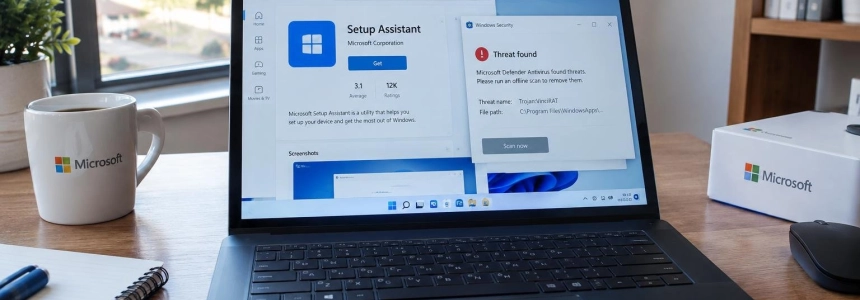
Setup Assistant, from Microsoft Store, was used as an entry point to install Vinci RAT, a remote access trojan for Windows, according to research published by eSentire on November 24. ITPro reported the following day that the application was still available; Joho no Todai later found product pages that returned an error, but could not confirm whether Microsoft had officially removed it or whether it was no longer available within the Store app.
The infection analyzed began with a search for Snipping Tool that led to a fake website. The downloaded installer had a Microsoft signature and led to Setup Assistant; afterward, the application could receive and execute external instructions. The installer’s signature did not prevent the infection chain: the case does not show that all Store apps are malicious, but it does show why it is worth checking which application you install.
Check whether your computer matches the case
The name to look for is Setup Assistant, with the developer listed as ETPS Ltd. eSentire describes the application as an Electron-based utility and says it acted as a backdoor: it communicated with a command-and-control server, monitored the Downloads folder, and could execute PowerShell and JavaScript received remotely.
According to eSentire, that chain downloaded Vinci RAT. The capabilities attributed to the trojan include collecting information about the computer, searching for security tools, transferring files, and running programs or commands. It also observed persistence through a scheduled task. Uninstalling the app is not enough to rule out infection, because the malicious payload is installed separately from the Store application.
Do not identify the app solely by the developer’s name: Joho no Todai reports that a British company with the same name, ETPS Ltd., told ITPro that it does not publish apps on Microsoft Store. The displayed name therefore does not establish who published it. If you cannot find Setup Assistant but remember installing a purported Snipping Tool from a download page outside Microsoft, treat the incident as suspicious and consult security staff if this is a work computer.
What to do if it is installed
Disconnect the PC from the internet if you find Setup Assistant or suspect you installed it from the installer described. The recommendation published by eSentire and reported by GSMDome is to cut the connection. Do not continue using the computer to sign in to services or download tools while it is being investigated.
Contact IT security if the computer belongs to a company or organization. Joho no Todai recommends consulting security staff. Report that you saw Setup Assistant and how it got onto the device, if you remember; do not consider the incident resolved just because the app no longer appears.
Uninstall Setup Assistant using the usual Windows options for removing installed apps. The reports do not provide a specific menu path, so do not follow navigation instructions you cannot verify for your version of Windows. Removing the app removes that component, but does not confirm that the RAT is gone.
Run Microsoft Defender Offline, the offline scan GSMDome recommends for this case. Follow the instructions from Microsoft Defender on the computer itself. Do not replace this step with uninstalling the app: the trojan was downloaded afterward and could establish persistence with a scheduled task.
Consider the computer potentially compromised until the review is complete. GSMDome recommends disconnecting, uninstalling, and running the offline scan; Joho no Todai also advises using antivirus software and consulting security staff. If Defender detects threats or you cannot complete the scan, follow the instructions of your security lead or your organization’s support team.
If you were looking for a screenshot tool
The lure observed by eSentire imitated a Snipping Tool download. Joho no Todai notes that the tool is already available in Windows 10 and Windows 11 and that Windows + Shift + S starts a screenshot. If you only need to take a screenshot, use that shortcut instead of looking for an installer on an unfamiliar website.
The campaign also used domains that appeared to offer software such as Microsoft Teams and Roblox, according to eSentire. The research mentions snipp.codes-team[.]com as the site that initiated the analyzed incident. If a download page redirects you to an application whose name does not match the tool you were looking for, stop before installing it.
Mistakes that can leave the risk unresolved
Do not treat a Microsoft signature as a guarantee that the application is safe. In the case investigated, the installer was signed and led to an application distributed through the Store; the signature did not prevent the program from acting as a backdoor.
Do not stop at uninstalling the app. Vinci RAT was downloaded in a later stage, and the research describes a scheduled task to maintain execution. That is why GSMDome also recommends Microsoft Defender Offline.
Do not assume its removal has been confirmed. ITPro saw the app available on November 25. Joho no Todai found the product’s web pages inaccessible later that night, but did not confirm an official announcement or its status within the Store. That difference does not change what to do if you have already installed it.
Do not download a replacement from another website just because the original link no longer works. For screenshots, Windows + Shift + S opens Snipping Tool in the versions indicated by Joho no Todai; avoid repeating the search that led to the fake page.
eSentire said Microsoft initially responded that the application did not violate its terms. As of the checks reported by the cited publications, availability within Microsoft Store remained unclear; if Setup Assistant is already on your PC, take action on the device without waiting for that status to be resolved.
Sources: eSentire, IT Pro, GSMDome.com, Joho no Todai