Google is rolling out access to Gemini’s Business Profile tools for businesses that manage their profiles with a Workspace account. The announcement appeared in Google’s Small Business Bulletin, published in the Business Profile community on November 5 by Lisa Landsman, Head of Industry Engagement & SMB Success.
The rollout opens the connection to corporate email addresses, but the help documentation reviewed on November 6 still says users need to sign in with a personal Google account. It also maintains an important limitation for agencies and businesses with multiple locations: only owners or managers of a single verified profile can connect, and only from Gemini on the web.
Workspace joins the rollout, but help still requires a personal account
Google’s bulletin describes Workspace access to the Gemini and Business Profile integration as «rolling out». The connection lets users link a verified business profile to Gemini using a corporate account, rather than relying on a personal Gmail address. Google announced this integration in June; the new notice now expands the types of accounts that can use it.
There is, however, a discrepancy between the announcement and the available instructions. The Google Business Profile help page still says users must access Gemini with a personal account associated with the profile and states: «For now, this feature isn’t available if you’re signed in with a work or school Google Account».
For organizations that want to enable access, the bulletin adds an administrative requirement: a Workspace administrator must allow the Gemini app to be used from the Admin console before employees can link a profile. Google has not specified when the change will reach all accounts.
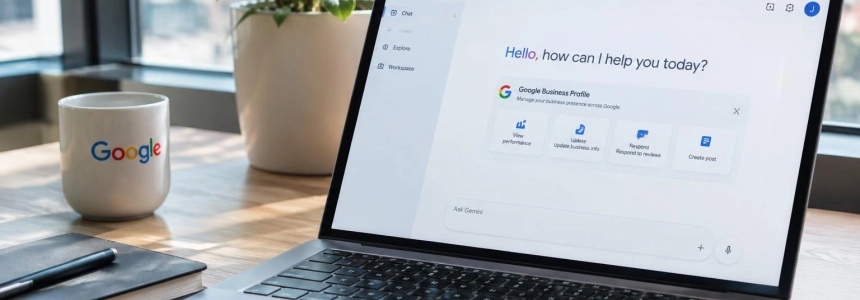
The help page describes what the integration offers once connected. Gemini can edit hours and contact details, manage action links, draft review replies, and create posts. It can also summarize recurring themes in customer comments and retrieve performance metrics and the searches that lead customers to the business.
One verified profile per user, and web access only
The connection remains limited to owners or managers of a single verified profile. The official page excludes people with access to more than one listing, so the new Workspace compatibility does not amount to a tool for managing multiple clients’ profiles in bulk from a single session.
Users must also use Gemini on the web, at gemini.google.com; the help page does not describe the connection as a feature available in mobile apps. To use it, users must be at least 18 and have Keep Activity turned on. Google explains that Gemini cannot connect to Business Profile if that activity is turned off.
Once the account is linked, users can ask questions about the profile or request changes. If Gemini does not activate the Business Profile app on its own, Google recommends including «@Google Business Profile» in the prompt. The connection can be turned on or off in the connected apps settings.
The help page details specific management tasks. For food businesses, Gemini can create, update, or delete menus, including sections, dish names and descriptions, and prices. It can also review attributes such as «outdoor seating», «happy hour», or «Wi-Fi», although the options depend on the business category. In the content section, users can create, schedule, publish, or delete posts about updates, offers, and events.
The tool can retrieve reviews and their ratings, as well as draft or delete replies. For metrics, Google lists views, website clicks, direction requests, and bookings; users can also review the keywords customers use to find the business.
Photos, videos, and a notebook for the business
The November bulletin says owners can add photos and videos directly in the Gemini chat by uploading them from a device or from Google Photos. Google suggests two uses: adding images to the profile gallery or using them to create posts. One example prompt mentioned is setting special hours for Black Friday.
The help page’s description does not entirely match that announcement: its media section mentions uploading images from a public URL and retrieving files submitted by the owner or customers, but does not say they can be selected from a device. The available official information separately describes a business notebook within Gemini.
To create this notebook, users must have Business Profile connected and confirm or enter the business website address. The space has the same name as the business in its profile. It can show proactive suggestions, such as completing missing details, adding an exterior photo, or reviewing performance, as well as recent conversations and suggested prompts.
Google introduced the integration and notebooks on June 10, with a global rollout planned for that month, although the European Economic Area and the United Kingdom were excluded at the time. The idea was for Gemini to use reviews, customer questions, performance data, and the website as context to offer recommendations, help with replies, and update the profile.
On October 20, Google announced a new homepage for small businesses within Gemini and introduced connections to Google tools and third-party apps. The post mentioned Business Profile, Google Ads, and Workspace, as well as Adobe, Canva, Dropbox, Shopify, Wix, Zoho, and Xero. Google said the page, marketing and finance features, and new connected apps would begin rolling out globally in the following days for Gemini users.
Google Maps puts «Message» next to «Call»
The «Message» button is moving up on Google Maps listings that have chat configured. It now appears next to the «Call» button on Android and iOS devices, according to Landsman’s bulletin. Previously, finding the messaging option required scrolling further down the profile.
We’ve expanded the feature so customers on both Android and iOS can now find a prominent Message button right next to “Call” on your Google Maps listing. Previously, finding chat on Maps required scrolling deep down into your profile. Now, whether a customer views your profile, opens the expanded header, or uses the bottom action bar, messaging is front and center.
— Lisa Landsman, Head of Industry Engagement & SMB Success, Google
Tapping it takes customers to the chat option configured by the business, which can direct them to WhatsApp or text messages. Google’s help page says that if the profile offers both options, customers will only see the text messaging option. It also clarifies that chat is available in certain regions and may not be enabled on all profiles.
The more prominent placement may make it easier to start a conversation, but it also puts the contact route in a highly visible area of the listing. The bulletin itself warns of the practical risk: a broken link or an unattended inbox could appear among the main buttons people see when they open the business on Maps.
Documentation removes region and language restrictions
The current help page no longer lists the European Economic Area or the United Kingdom as excluded regions. An archived version from October 13 did say that the Gemini connection was unavailable in those regions and specified 12 supported languages. The current page, by contrast, says the feature is available wherever the Gemini web app is supported.
The November bulletin does not clarify which languages are included or detail regional availability. The help page update also does not resolve the discrepancy about work accounts: it retains the personal account requirement even though Google says Workspace is entering the rollout. People who manage profiles in the EEA or the United Kingdom can check whether the connection option has appeared, but the current terms still include the one verified profile limit.
Google has also introduced changes to other Business Profile tasks. The hours editor now includes a «Generate hours» section: the owner enters the hours in plain language, and Google fills in the fields. Examples include days by appointment only and a lunch break. The help page says this feature is available in certain regions and languages and lets users review and edit the result before saving it.
For restaurants, the dashboard lets users hide third-party ordering services, although Google says a service disappears completely only if it is disabled for both pickup and delivery. The vegetarian and vegan menu labels are joined by «dairy-free» and «gluten-free» labels, as well as kosher and halal options, which Google says should only be used when certified.
For appeals, users can attach supporting documentation before submitting a request. Evidence is optional, but Google allows each appeal to be submitted only once. For Workspace accounts, the next thing to check is whether the help page updates its personal account requirement and how the one-profile-per-user limit is reflected.
Sources: Search Engine Journal, Google, Google Business Profile Help, Google