Google launched Data Manager in beta within Google Analytics on November 6. The tool adds a space to the admin panel for managing data streams, linked products, and first-party data; it also displays a connection map and diagnostic alerts. The operational warning is clear: configuring the same data stream in Analytics and Google Ads can record conversions twice.
The new feature appears in the Analytics admin console and is designed to connect, activate, and measure first-party data from a single place. Google confirmed the launch in its November 6 updates, after Davide Porelli shared a screenshot of the beta section in the admin interface on October 29. The screenshot documented its appearance in one account; it did not establish when it would reach all properties.
A central panel for connections and diagnostics
Google describes Data Manager as a unified hub for managing links to other products, data streams, and first-party data imports. The tab is in the left-hand navigation of the admin page, below “My preferences.” The appropriate permissions on the Analytics property are required to use it.
The panel brings together functions that could previously be spread across different configuration areas. Google highlights four benefits: centralized management for setup and troubleshooting; an integrated import experience with more connectors; visualization of data journeys; and a data quality guide that looks for measurement gaps and offers recommendations based on specific signals.
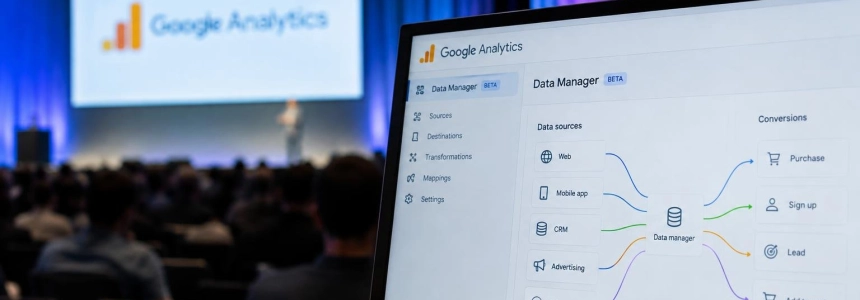
The main visual element is the connection map. The Google Analytics property appears in the center, with sources on the left and destinations on the right. The view lets users trace how data reaches the property and which products it is exported to. Hovering over a node highlights the full path; selecting it opens a card with additional information. The expanded and full-page views support filtering by node or column name and allow connection groups to be expanded.
The map organizes information into four columns. “Data sources” identifies the origin: it may be Google Tag Manager, a CRM platform, a product link with Google Ads, or an offline file. “Data types” shows the type of import when applicable; product-linking integrations do not pass through this column. “Property and streams” details how information connects to Analytics, including web and app streams. “Data export” indicates which products receive events exported from Analytics.
The documentation distinguishes between a mini view, an expanded view, and a full-screen view. The expanded view may show node details, such as Google Sheets names or tag IDs. If a source has a problem, the node may show a broken status or a red indicator. Opening it displays a card summarizing the failure and may provide a button to fix it in the interface.
Below the map, the connection list is divided into data streams and connected products. The first section includes web and app streams and offers “Add stream.” The second shows product links and imports, with the “Connect product” option. To create a connection, users choose a source from a list, indicate how its data will be used, and start the setup. Connections can also be removed from the corresponding panel.
Flow direction matters
Data flows from Analytics to Ads and Google Marketing Platform when the new connection is created in Analytics Data Manager. The documentation recommends keeping connections that are already managed in Google Ads or GMP there, rather than duplicating them from Analytics. Imports that already existed in Analytics appear automatically in Data Manager; Google recommends using the new tool for future connections.
The reason not to configure the same route twice is that it can duplicate conversion recording. If an identical stream is enabled in both interfaces, conversions may be counted twice. Google does not describe an automatic mechanism in the cited documentation for detecting or reconciling this duplication: the recommendation is to avoid creating the same connection in both places.
Direction also has a practical consequence: data added through Data Manager in Analytics is sent to linked Ads and GMP accounts, but the flow does not work in reverse. Connections already managed from those products should continue to be managed there, according to Google.
Some data types must be configured directly in Analytics Data Manager. Google cites item data and third-party campaign data. The external system import documentation includes guides for Meta, TikTok, Pinterest, Snap, and Reddit, as well as a Campaign Data Import option for Google Sheets and instructions for importing campaign, item, user, and event data.
Beta with access and property limitations
Availability depends on the property’s permissions, and there is one explicit limitation: subproperties and roll-up properties do not currently support the Data Manager home page. Google does not say when it will add support. The documentation also does not specify which exact roles meet the permission requirements.
The official November 6 launch came after several months of indications that Data Manager was expanding beyond Google Ads. Google announced in September that it would integrate the tool into Analytics and Display & Video 360. PPC Land’s timeline places the release of the Analytics beta 57 days after that announcement. Earlier, on October 29, the screenshot shared by Davide Porelli already showed the section in an account, but that observation was not equivalent to a general availability date.
The integration also fits with other Data Manager changes described by PPC Land. In May, Google announced a map view for Data Manager in Google Ads, showing connections from sources such as BigQuery, Google Drive, HubSpot, and Shopify to Google products. The Analytics version uses a similar representation, with the Analytics property at the center. In December 2025, Google had launched a Data Manager API for Google Ads, Google Analytics, and Display & Video 360.
In 2026, work with Analytics data through that API also expanded. Google’s May 7 updates mentioned support for Analytics events sent server-to-server. PPC Land reported that version 1.7 of the API, on May 28, expanded offline conversion ingestion to Campaign Manager 360, Search Ads 360, and Display & Video 360. These developments provide context for the system’s expansion, but they do not change the immediate recommendation for anyone setting up connections in the new beta: check where each stream is active before creating another.
What to check before creating a connection
The feature is designed to make it easier to visually inspect data journeys and manage connections, not to certify on its own that every measurement is correct. The map can flag status issues with a source and show the path to a destination; before changing a configuration, it is worth checking whether the connection already exists in Google Ads or GMP, or whether it is a previous Analytics import that will already appear in the new panel.
To connect a new product, Google says to go to “Connect product,” search for and choose a source, select how its data will be used, and start the setup. The interface also offers controls for viewing details, filtering nodes, and deleting connections with confirmation. The help documentation does not detail which specific errors the “Fix” button can resolve or when a repair requires changes on an external platform.
The release date is confirmed, but the documentation does not say when the beta will end or when the page will be enabled for subproperties and roll-up properties. In the meantime, the new map lets users see the connections available in a property, and Google asks them to avoid duplicating any stream across both interfaces.
Sources: Search Engine Roundtable, Google Analytics Help, Google Analytics Help, PPC Land, Paid Media Collective