The three Linux Mint 27 Adrien beta images are now listed as approved for testing on the project's ISO page, although the official announcement has not yet been published. The release is based on Ubuntu 26.04 LTS and comes in Cinnamon, Xfce, and MATE editions; anyone installing it should bear in mind that the images may still be replaced.
Linux Mint had not yet opened its bug tracker or formally announced the start of testing, according to OMG! Ubuntu. The Linux Mint ISO page, however, shows all three images with the status “Approved for BETA release”: Cinnamon, Xfce, and MATE. The filenames indicate that they were created on November 25, 2026.
| Edition | Desktop | Approved ISO |
|---|---|---|
| Cinnamon | Cinnamon 6.8 | mint-27-cinnamon-amd64-2026.11.25-12.29 |
| Xfce | Xfce 4.20 | mint-27-xfce-amd64-2026.11.25-14.53 |
| MATE | Version differs between publications | mint-27-mate-amd64-2026.11.25-11.05 |
The MATE version is listed as 1.26 by OMG! Ubuntu and as 1.28 by SoftZone, which also notes that another publication gives the former number. Linux Mint confirms that the MATE ISO has been approved but does not specify which desktop version it includes in its listing. Joho does not provide that number.
A beta available before the announcement
OMG! Ubuntu and the Linux Mint forum noted that the images might appear on mirrors before the team gave the public go-ahead for testing. The forum says that all three ISOs could be replaced before the official announcement, something to keep in mind if you start downloading them now. Linux Mint also lists an Xfce build from November 25 marked as rejected, along with earlier builds of all three editions.
On November 26, Joho no Todai reported that the ISOs were available on the mirrors of Clarkson University and Rackspace. It also noted that files for checking the images' integrity and signatures were provided, and referred readers to the official verification instructions. Downloads are available from the official Linux Mint mirrors, including those intended for testing.
SoftZone recommends against using a preview release on computers used for everyday work. For a dual-boot installation, it advises backing up data before resizing partitions. OMG! Ubuntu adds another note of caution: during partition setup in the new installer, users familiar with the previous process should carefully review the options.
Ubuntu 26.04 LTS and Linux 7.0 under the desktop
Linux Mint 27 moves away from the 22.x series base and adopts Ubuntu 26.04 LTS and Linux 7.0. According to OMG! Ubuntu, it inherits package and driver updates from Ubuntu; it is also expected to receive later kernel versions through Ubuntu's HWE updates. Linux 7.3, that publication adds, should arrive soon.
SoftZone also cites Mesa 26.0 as part of the graphics stack. The publication links the new base to compatibility with recent hardware, including network drivers and graphics cards. Joho describes the numbering change as part of an annual release policy: the number will indicate the following year, and the planned sequence runs through 27, 28, and 29.
| Release policy | Before | Starting with Mint 27 |
|---|---|---|
| Frequency | One release every six months | One per year |
| Point releases | Releases such as 22.1 | Discontinued |
| Numbering example | 22.1 | 27, 28, 29 |
Joho explains that the provisional name during development was Mint 23 Alfa, and that the numbering was later changed when the new policy was announced. The project has also started preparing periodic HWE ISOs to maintain support for newer hardware: when a new kernel becomes available in the packages for the current release, it plans to offer an image that includes it. The developers believe the longer work cycle has made it possible to tackle changes that were previously out of scope, although they also expect more work during the beta.
Cinnamon 6.8 changes gestures, windows, and sound
The flagship edition includes Cinnamon 6.8. New features described by OMG! Ubuntu include one-to-one trackpad gestures, which maintain a direct correspondence between finger movement and on-screen scrolling, in both Wayland and Xorg, according to Joho. On multi-monitor setups, users will be able to assign a different wallpaper to each screen.
Windows can also be pinned to stay above other windows from the window list's context menu. In the network applet, WireGuard and VPN connections are grouped together. If volume amplification is disabled in the sound applet, the level returns to 100%; Cinnamon also lets users check the keyboard layout without additional tools.
Wayland is no longer marked as “experimental,” but that does not make it the default session or guarantee a flawless experience. OMG! Ubuntu notes that project lead Clement Lefebvre said in June that X11 would remain the default option for the time being.
Power management is also changing. Linux Mint brings back hibernation for laptops and adds a panel for configuring sleep modes. Joho explains that suspend keeps the system state in memory and requires power, while hibernation saves it to storage and powers off the computer; the latter requires enough swap space, and resuming may take longer than a reboot.
Joho also describes hybrid mode, which combines suspend and hibernation, and an option to switch automatically from suspend to hibernation when the battery reaches a critically low level. According to the publication, this setting is intended to spare users from having to choose a mode manually each time. SoftZone mentions a Suspend action in the main menu that lets users hibernate without resorting to advanced settings.
Nemo and Mint's own applications
The Nemo file manager adds a preview for images, audio, and video: select one or more files and press F7 to activate it, according to OMG! Ubuntu. Joho adds that the panel will be able to show when a photo was taken and information about the camera used.
The beta includes Linux Mint project applications developed within XApps. Velocitty will be the default terminal; Superlight, the system monitor; Unfold, the archive manager; and Xepub, the e-book reader. SoftZone also lists Clockenstein, for calendars, and Clocks, for alarms, and says there are six new applications. OMG! Ubuntu confirms the debut of a calendar application and a clock tool, although it gives them different names.
Superlight will display CPU, memory, and GPU usage, network activity, disk reads and writes, temperatures, and fan speeds, according to Joho. It will also be able to break down the space used by Steam games and Flatpak applications. Velocitty will offer configuration changes per tab, that publication adds; Unfold will let users browse, create, and extract archives, although OMG! Ubuntu warns that it does not yet support drag and drop.
SoftZone highlights that the System Administration tool will let users manage installed kernels through a graphical interface: install, switch, or remove versions without using the terminal. It also mentions support for oo7, a Secret Service provider for managing saved credentials in encrypted form. Thingy, the library application maintained by Mint, is getting a complete redesign, according to the same publication.
The new installer is already raising questions
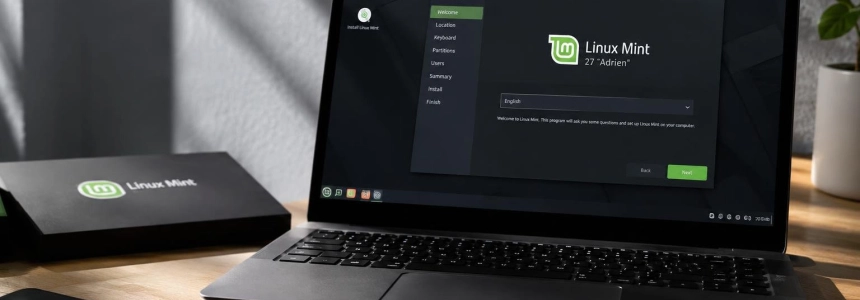
Instead of Ubuntu's Ubiquity installer, Mint 27 uses the live installer used in LMDE, the Debian-based edition of Linux Mint. OMG! Ubuntu says the overall process is similar to the previous one, although it recommends paying close attention to partitioning. On the forum, one user asked whether it was possible to install the beta using /dev/mapper devices; another replied that it was failing in their case and described it as a regression compared with Mint 21 and 22, with possible implications for encrypted or LVM configurations.
“This beta is failing to use /dev/mapper devices for installation. It's a huge regression compared to Mint 21 and 22 series.”
— Peng, Linux Mint forum user
That comment describes an experience shared on the forum; it is not confirmation from the project team. In the same thread, another participant asked whether the problem came from Mint or Ubuntu; the reply said that Mint 27 would use a newer version of the live installer previously used in LMDE. The forum also includes a complaint about Velocitty keyboard shortcuts: one user said they could neither change nor disable the shortcuts, and that F10 opened the terminal's settings menu.
The stable release is expected around Christmas
The announced schedule places the final release of Linux Mint 27 around Christmas 2026. OMG! Ubuntu gives that date as an expectation, while SoftZone suggests late 2026 or, at the latest, early January 2027. Joho also says the release is expected around Christmas. SoftZone notes that the exact date depends on all mirrors finishing synchronization and the official announcement being published on the Linux Mint blog.
For now, the approved ISOs remain available for testing, but the bug tracker was still closed when OMG! Ubuntu published its report. The official beta announcement is still pending, and the images could change. On the Linux Mint forum, a user reported problems installing the beta with /dev/mapper devices.
Sources: OMG! Ubuntu, SoftZone, Linux Mint, Joho no Todai, Linux Mint Forums