A vulnerability with a severity rating of 9.8 out of 10 affects Ultimate Member, a WordPress plugin for profiles, registrations, and communities. RedesZone reports that CVE-2026-134481 allows PHP objects to be injected through insecure deserialization, without requiring the attacker to have an account or the victim to take any action.
The advisory appeared on November 26, 2026. RedesZone notes that the attack can be launched over the network with low complexity and no privileges. The report does not confirm ongoing attacks: as of November 27, the flaw was not listed in CISA's KEV catalog, and no public exploit code had been identified on the platforms mentioned.
Who should check their WordPress site
Anyone administering sites with Ultimate Member version 2.14.1 or earlier should check. The plugin is used to create user profiles and registrations, member directories, and membership sites; if none of those features sound familiar, do not assume it is installed—check your WordPress plugin list.
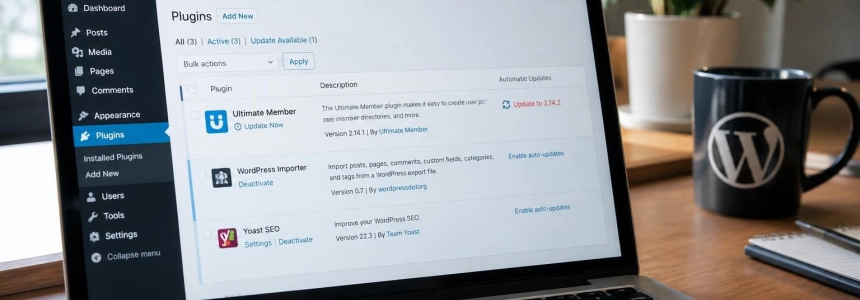
RedesZone says you can simply open the admin dashboard and view the list of plugins to see the version next to Ultimate Member. If you manage several sites, repeat the check on each installation: an updated version on one website does not prove that the others are up to date.
There is a detail to note about the fixed versions. RedesZone identifies 2.14.2 as the first version with the fix for CVE-2026-134481. The WordPress.org page also lists version 2.14.3, released on November 25, and describes a related PHP Object Injection fix in that release. Therefore, install the latest version WordPress offers you, as long as it is at least 2.14.2.
What to do, step by step
Locate all your installations. In each WordPress dashboard, open the list of installed plugins and look for Ultimate Member. Note whether it appears and which version is shown. You do not need to interpret the CVSS score to decide: the practical cutoff is version 2.14.1.
Prioritize any vulnerable version. If the plugin is on version 2.14.1 or earlier, consider that installation exposed to CVE-2026-134481. The vulnerability does not require authentication, so having registration closed or limiting who can log in is not enough.
Back up your files and database before updating. RedesZone recommends this precaution in case the new package conflicts with another plugin or the active theme. Make sure the backup has completed before continuing.
Update Ultimate Member to version 2.14.2 or later. RedesZone notes that the fix was released in version 2.14.2. WordPress.org lists 2.14.3 as the published version, and its changelog includes a security fix for PHP Object Injection. Do not stay on an earlier version just because the site appears to be working normally.
Verify the version after updating. Return to the plugin list and confirm that Ultimate Member shows the installed version and that it is 2.14.2 or later. If the number has not changed or the update failed, treat the site as still needing a fix and resolve the update issue.
If you cannot update right now, temporarily reduce exposure. RedesZone mentions a web application firewall that filters suspicious serialized-data patterns and regularly reviewing server logs. These are general temporary measures, not an equivalent substitute for the patch; schedule the update as soon as possible.
Review access logs if you need to check for unusual activity, especially while the installation remains unpatched. The report does not provide specific indicators for identifying an attack or a forensic analysis procedure; do not automatically attribute every unusual event to this CVE.
What is known about the technical risk
The CVE entry cited by RedesZone describes deserialization of untrusted data: the plugin processes serialized data and, if it does not properly check where that data came from, it could create unintended PHP objects. The entry says this could allow code execution, although it does not detail what actions might be possible on each server.
The potential impact goes beyond a visible plugin feature: RedesZone warns that an exploit could affect the server running WordPress. This does not mean that every vulnerable site has been compromised, nor does a specific site failure prove that the vulnerability was exploited.
It is also worth distinguishing this specific fix from the plugin's broader security history. Patchstack lists other Ultimate Member vulnerabilities, and WordPress.org describes several security fixes in version 2.14.3. For this case, the immediate action is to address CVE-2026-134481 by installing the fixed version; the other entries do not, by themselves, prove that your site is affected by them.
Mistakes to avoid
Do not wait for symptoms. The described attack does not require anyone to interact with the page, so the absence of visible alerts or errors does not confirm that a vulnerable installation is protected.
Do not confuse login controls with protection. According to RedesZone, the vulnerability can be exploited without authentication. Changing who can register or log in does not replace updating the plugin.
Do not treat a firewall or logs as a patch. These are temporary resources mentioned to reduce risk when an update is not possible. The recommended fix is Ultimate Member 2.14.2 or later; confirm in the dashboard that this version is actually installed.
Do not assume that exploitation occurred. The report does not confirm attacks and notes that, as of November 27, the CVE was not listed in CISA's KEV catalog and no public exploit had been found on the platforms cited. This lack of public reports also does not guarantee that no site has been attacked: the practical steps are to check the version and update it.
Sources: RedesZone, BleepingComputer, The Hacker News, Patchstack, WordPress.org