A supposed GTA 6 client for Windows could end up stealing passwords, browser sessions, and data from gaming and cryptocurrency accounts. Bitdefender analyzed a campaign that prompts victims to run a PowerShell command; the game has no official PC version announced by Rockstar, so any download promising to install it is worth stopping to think about before opening it.
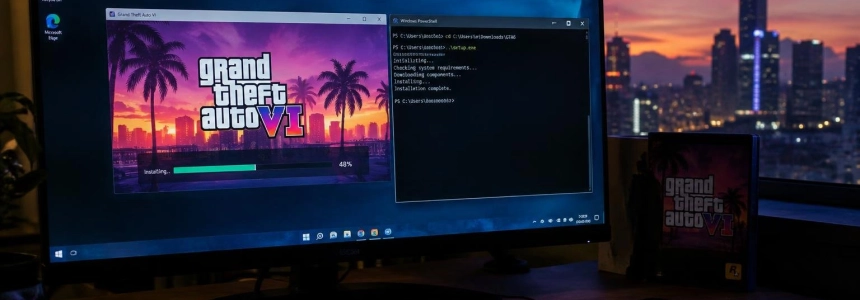
The lure does not always appear as a traditional installer. Bitdefender found a website offering a supposed player to stream the game from a console and, if the user does not download the file, instructing them to open Run with Win+R, paste a PowerShell command, and execute it. The campaign targets Windows users looking to play on PC.
How to tell if you followed the lure
The clearest sign is having pasted a PowerShell command provided by a page promising access to GTA 6 into Run. Bitdefender explains that the command downloads a script, which then retrieves a ZIP file and launches an executable from the user's AppData folder. If you took those steps, treat the computer as compromised, even if a page resembling the game appeared on screen.
That appearance may be part of the deception: the executable displays a GTA-themed page and plays the trailer while downloading other files in the background. Bitdefender also describes a variant that uses a legitimate Windows tool to load a malicious DLL and hide the activity. So seeing a convincing window or noticing no obvious changes does not prove the computer is clean.
Simply visiting the website does not complete that chain, according to Bitdefender: the infection described begins when the person runs the command or opens the downloaded file. If you only loaded the page and did not download or run anything, close the tab and do not enter any information.
What to do, step by step
Disconnect the suspicious PC from the internet if you ran the PowerShell command or opened the supposed client. Bitdefender recommends isolating it from the network and not using it to change passwords or manage sensitive accounts while the infection is being addressed.
Scan the computer with reliable security software after disconnecting it. Bitdefender says to run a scan with trusted security software. Do not assume the problem is resolved just because the fake window disappears or you cannot find any visible files.
Reinstall Windows if the computer cannot be confirmed clean. If the security tool cannot confirm that it removed the infection, Bitdefender recommends seeking help from a security professional or reinstalling Windows from trusted installation media. Do not download the supposed game again to check whether the computer is working.
Change your email password first from another clean device. Then update the passwords for your gaming, financial, and other important accounts, and sign out of active sessions. Also check recent activity and recovery information in case someone changed them.
Check the accounts you used on that PC, not just GTA or Steam. Bitdefender says the stealer may look for browser credentials, cookies, and tokens, as well as data from Discord, Steam, cryptocurrency wallets, and AI or development services. It may also access the clipboard and take screenshots.
Check any wallet from a clean computer if you used it on the affected computer. If you see suspicious transactions, contact the wallet provider or exchange, as Bitdefender recommends. Do not use the compromised PC to sign in or manage funds.
Verify downloads through official channels before installing anything. AdGuard notes that GTA 6 was released for PS5 and Xbox Series X|S, and that Rockstar had not announced a PC version or a confirmed date. A third-party installer, a page featuring game artwork, or a promise to stream from a console does not establish that a file is legitimate.
“There is no PC version on November 19. If you see one, it's a scam.”
— Marijus Briedis, NordVPN Chief Technology Officer
What the malware may be trying to steal
The impact may go beyond losing access to a gaming account. Bitdefender describes an information stealer capable of collecting browser credentials and cookies, authentication tokens, wallet data, and clipboard contents. It may also look for access keys to AI and development services, a risk for anyone who uses the same PC for gaming and work.
Another campaign described by AdGuard used a fake PC installer with instructions to run it as administrator, ignore a security warning, and add an antivirus exclusion. The file analyzed by Cynet turned out to be WARDEN Stealer. These are different lures, but being asked to disable protections or ignore warnings is reason enough to cancel the installation.
Mistakes that can make the problem worse
Do not paste commands you do not understand into Run, PowerShell, or Command Prompt just because a website says they are needed to install or play the game. Bitdefender identifies this instruction as the entry point for the campaign it analyzed.
Do not turn off your antivirus or allow exclusions so a suspicious installer can run. AdGuard warns that some fake-installer instructions are specifically designed to make users ignore warnings or allow the file.
Do not change passwords from the affected PC. If the computer has an information stealer, the new credentials could also be exposed. Use another clean device and sign out of active sessions.
Do not mistake a visual demo for a working game. The client analyzed by Bitdefender displayed a themed page and the trailer while downloading other components. The appearance of a window does not verify the program's origin or safety.
Do not connect a wallet to a dubious store or approve requests you were not expecting. AdGuard documented a fake store imitating PlayStation Store that led to a program designed to drain wallets. This is not the same method as the fake PC client, but both exploit interest in the game.
Unofficial PC projects that have appeared online do not turn a download into a Rockstar version either: Computer Hoy reported that the CGBJ repository was no longer available, while Wccftech described a private fork reaching between 25 and 30 FPS. Neither of these developments constitutes an official release; if a site is offering a Windows executable now, the practical question is whether you are willing to trust it with your credentials and your computer.
Sources: Computer Hoy, Wccftech, Hot for Security, AdGuard Blog, PC Gamer