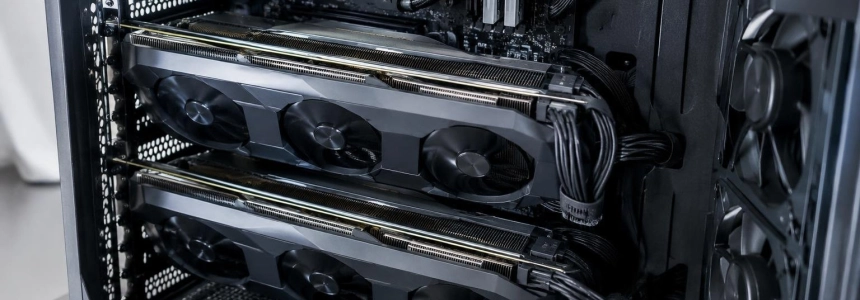
Two GPUs in a PC are making sense again, but no longer for splitting frames in video games: the goal is to fit larger AI models into local memory. Tools such as llama.cpp and ComfyUI can already take advantage of multiple cards for certain tasks; the benefit may be more available VRAM or more computing power, although not all combinations or workflows behave the same way.
The shift contrasts with the old SLI and CrossFire era, when Nvidia and AMD promoted multi-card configurations for gaming. XDA places the decline of that use at the end of the 2010s: microstuttering and compatibility problems, along with games no longer being optimized for multiple GPUs, made the setup less appealing. The trend did not disappear completely, but the workload that justifies it is different now.
From splitting frames to splitting models
For local AI, video memory can be the practical limitation: if a model’s weights and context do not fit on one card, splitting the work across multiple cards makes it possible to try running it without relying on a single GPU with more VRAM. XDA cites the rise of open-weight models and tools such as llama.cpp, Ollama, and LM Studio as part of this resurgence.
The important distinction is that adding VRAM does not mean doubling tokens per second. If the model already fits on one card, using another may not proportionally improve generation. By contrast, splitting a larger model can expand the size of what runs locally or the available context. XDA notes that splitting across cards can also be limited by differences in bandwidth and computing capacity.
Nvidia describes a recent evolution in consumer software. According to its guide, llama.cpp added tensor parallel, which splits a model across two GPUs so both can be used for computation; Nvidia compares it with the earlier pipeline parallel method, which shared VRAM without making use of dual-GPU computing in the same way. Nvidia says tensor parallel can deliver up to approximately 1.8 times the computing performance and up to twice the memory capacity—maximum figures that should not be mistaken for a guarantee for every model or configuration.
What changes from one application to another
ComfyUI can also distribute work across cards using its MultiGPU CFG Split node. Nvidia says that speedups of up to 1.95 times have been measured in common workflows, but notes that the result depends on the model and workflow. The technique requires CFG to be greater than 1; distilled workflows that run with CFG = 1 do not benefit from that node. Compatibility depends on the specific workflow, not just on installing a second GPU.
The difference between methods also matters to anyone developing or maintaining an application. In Nvidia’s example, pipeline parallel distributes memory, while tensor parallel adds simultaneous computation on both cards. ComfyUI, meanwhile, splits one stage of the diffusion process. There is no universal solution: each tool defines which parts of the workload it distributes and what restrictions apply.
Software support can be stricter than the physical possibility of installing two cards. Nvidia says the optimizations cited require two homogeneous GPUs: cards of the same type, such as two RTX 3090s or two RTX 5070 Tis. XDA, by contrast, suggests other uses for mismatched hardware: assigning image generation to an RTX 3080 Ti while leaving a language model running on a GTX 1080. These are different approaches: separate workloads are not the same as splitting a model.
This distinction has implications for systems that already have a GPU. An older card may still be useful for another task, as in XDA’s example, but you should not assume that a mixed pair will work with Nvidia’s tensor parallel optimizations. Nvidia’s guide explicitly excludes mixed GPU types in that mode.
Memory enables larger models, with specific limits
Nvidia’s guide estimates that a 30-billion-parameter model quantized to 4 bits needs at least 24 GB of VRAM. For a 70-billion-parameter model, it estimates 40 GB or more; a 120-billion-parameter model may require around 70 GB when context is included. These are approximate figures from Nvidia’s own guide, and they show why two cards can be appealing even when they do not speed up a particular task: the model may be too large for a single GPU.
PromptQuorum gives the example of two 16 GB RTX 5060 Ti cards, for a total of 32 GB, to host a 32-billion-parameter model in Q4, which it estimates at around 20 GB. Its calculation puts a 70-billion-parameter model in Q4, estimated at around 43 GB, beyond VRAM; the remaining layers would have to be moved to system RAM. The page did not measure the performance of this configuration, so it provides no speed figure for comparison.
Price also affects the decision, although it depends on the market and the parts chosen. PromptQuorum estimates the complete build at around $2,680 in the United States, with the two cards accounting for around $1,600 based on its reference prices. This is not a universal comparison with a high-end GPU: the publication cautions that prices change and that a motherboard supporting x8/x8 can increase the total cost.
At the experimental extreme, Tom’s Hardware described a setup with four used 32 GB Nvidia V100s connected to a Lenovo M720q Tiny using OCuLink cables and a card with a PCIe switch. The system combines 128 GB of VRAM and, according to the publication, reaches around 285 tokens per second running Qwen3.8-27B. This is not a recipe equivalent to a conventional home PC: the setup required coreboot and a soldered bridge to get past a BIOS that would only boot with two cards.
The hidden cost is the platform
Two cards need more than two physical slots. XDA warns that some motherboards connect the second GPU to just four PCIe lanes from the chipset, which can limit performance. Nvidia recommends at least x8/x8 PCIe Gen 5 for its reference configuration and advises checking the manual: adding an M.2 drive can reduce the lanes available to a GPU slot. The electrical lane allocation of the slots matters, not their apparent size.
The difference between the guides also reflects the fact that there is no single set of requirements for every build. Nvidia recommends a 1,200–1,400 W power supply for two RTX 5080s and 1,800 W or more for two RTX 5090s; PromptQuorum estimates 850 W for its pair of RTX 5060 Ti cards. These are configurations with different cards, so those figures should not be carried over from one build to another.
Cooling and physical space are another limitation. Nvidia warns that two air-cooled RTX 5090s placed next to each other can overheat because the upper card reduces the air available to the lower one. XDA also lists power consumption, the power supply, and temperature among the costs to consider before buying. For a business, that sustained power draw and installation space are part of the cost of maintaining the system, not just acquiring it.
For developers, the practical implication is that multi-GPU support becomes a software decision: which method to offer, which combinations to support, and how to make the use of both cards visible. Nvidia suggests checking the activity of both GPUs during execution in Windows Task Manager. For llama.cpp, its guide says that tensor parallel mode does not yet support automatic parameter tuning; if an out-of-memory error occurs, it recommends reducing parameters such as the number of sequences or the context.
The right choice depends on the workload, not the number of cards
For people running local models, a dual-GPU setup makes the most sense when the first card is already short on memory or when a specific application can distribute the computation. If the model fits on one GPU, the benefit may be smaller; if the cards are different, the separate use described by XDA may be more practical than splitting a model with tools that require homogeneous hardware.
Businesses considering local workstations face the same trade-off: the ability to run larger models and greater control over execution, in exchange for a platform with greater demands for power, cooling, PCIe, and compatibility. The performance figure from one case is not enough to size another; ComfyUI measurements depend on the workflow, and PromptQuorum did not measure the performance of its 32 GB proposal.
The return of two GPUs does not bring back SLI or CrossFire. The question now is whether the application can distribute the model or process, whether the motherboard provides enough lanes, and whether the extra memory solves a real limitation. The value lies in running what would not fit before, not in expecting every workload to run twice as fast.
Sources: XDA, NVIDIA, Tom's Hardware, PromptQuorum