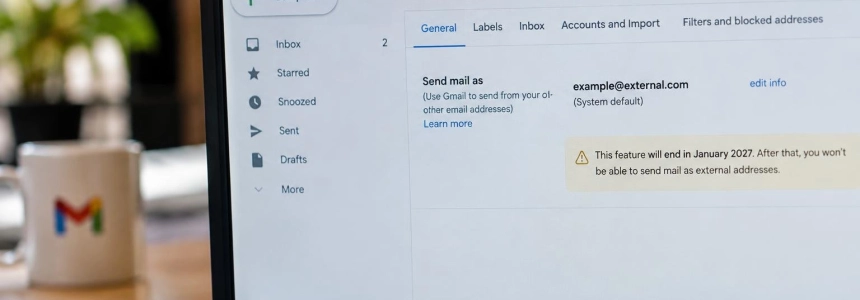
Starting in January 2027, Gmail will no longer let users send email as addresses hosted outside Google, a feature many use to reply from a custom domain or accounts with other providers. The change affects Gmail on the web and its mobile apps, but it will not remove message forwarding to a Gmail inbox.
Google announced the change on its help page about support for external accounts. The company says that, before the feature is fully retired, it may limit new “Send as” configurations during the transition period. Existing configurations will continue to work during that period, which covers the third and fourth quarters of 2026.
What will stop working and what will remain
The retirement covers three features for third-party accounts: sending messages with “Send as,” applying Gmailify to an external account, and bringing messages from other accounts into Gmail using the “Check mail from other accounts” option with POP. Gmailify applied Gmail tools, such as spam filtering and inbox organization, to an account hosted by another service.
The scope of “Send as” includes both Gmail on the web and the Gmail mobile apps. Therefore, continuing to read an external account in the app does not mean you can keep sending from that address: Google will retain access to non-Google accounts in its mobile app, but will remove the ability to send from them.
The main distinction is who hosts the address. “Send as” will remain available for other Gmail accounts and aliases associated with Google Workspace. In contrast, addresses from external providers—or custom domains hosted outside Google—are included in the retirement.
Google will also retain automatic forwarding to Gmail. Messages arriving at another provider can continue to be forwarded to a Gmail account, independently of “Send as.” And emails that have already been imported or received will remain in the inbox; the change affects future sending and synchronization features, not existing email.
Accessing Gmail from external programs will not change either. Applications such as Outlook, Thunderbird, and Apple Mail will still be able to connect to a Gmail account via IMAP or POP. Google also says the Gmail API will remain available for programmatic access.
Transition dates
| Date | What happens |
|---|---|
| Third quarter of 2026 | Announcements and in-product notices for affected users begin. |
| Third and fourth quarters of 2026 | The features remain operational, although Google may limit new configurations. |
| January 2027 | Gmail removes “Send as” for external accounts, Gmailify, and fetching other accounts via POP on the web. |
Google recommends using the transition period to switch methods. Its help page suggests sending from the external provider’s interface or app, setting up a desktop client with IMAP and SMTP, or continuing to use the Gmail mobile app to access those accounts.
The company warns about third-party extensions and services that promise to replicate “Send as.” According to Google, they may request email credentials or OAuth tokens, exposing accounts to security and privacy risks. Google says it cannot guarantee the security, reliability, or data practices of these tools and recommends its official options.
The case of domains that forward to Gmail
The change directly affects people who use a custom domain with Cloudflare Email Routing and forward their messages to Gmail. Email Routing redirects email, but does not host a mailbox: to Google, the domain address remains a third-party account. The possibility that a “Send as” configuration uses Gmail’s SMTP server does not change that classification.
With this setup, incoming messages will continue to arrive in Gmail, but replies will no longer be able to come from the domain address within Gmail on the web or in the mobile app. The Gmail app can still add external accounts when they have a mailbox accessible via IMAP; Cloudflare Email Routing, being a forwarding service without an IMAP server, does not provide this type of access.
The practical consequence is that receiving and replying will be separate: forwarding will continue to handle incoming mail, but you will need another way to send from the custom address. One option is to use a desktop email client that connects to the relevant SMTP server. Google specifically recommends a client with IMAP and SMTP support for people who rely on this feature.
Alternatives for keeping your sending address
For a custom domain, one option is to move email to Google Workspace. Once the address is hosted by Google, it can use “Send as” in Gmail. Google continues to support Workspace aliases, although migrating changes who hosts the domain’s email.
Another option is to configure a desktop client to send via SMTP. Gmail can remain one of the client’s accounts, but sending from the external address will depend on the provider hosting it. This alternative avoids relying on the Gmail feature that is going away, although it means no longer using Gmail’s web interface exclusively to send from that identity.
For Cloudflare specifically, EmailFast describes another possibility: using Cloudflare Email Sending as an SMTP server from a desktop application. Its guide specifies the endpoint smtp.mx.cloudflare.net on port 465, with implicit TLS, the literal username “api_token,” and a Cloudflare token with the Email Sending: Edit permission. To send to any recipient, it says the Workers Paid plan is required.
Cloudflare added authenticated SMTP sending in beta on June 8, 2026, according to the changelog cited by EmailFast. The guide says the Workers Paid plan costs $5 per month per account and includes 3,000 outgoing emails per month; above that volume, it charges $0.35 for each additional 1,000. The plan includes the volume for the account, not for each domain.
This approach also requires reviewing the domain’s configuration. EmailFast warns that when Email Sending is enabled, Cloudflare may add a DMARC record with a p=reject policy if the domain does not already have one. If Gmail is still sending as the domain, the guide recommends keeping p=none during the transition and tightening the policy once Gmail is no longer sending those messages.
What happens to existing accounts and messages
Google says that messages already imported will not be deleted. Access to external accounts from the Gmail mobile app will also continue, although the support that remains there covers reading and using the account, not sending from a third-party address through Gmail.
The POP retirement needs one clarification: Gmail will stop fetching messages from other accounts into Gmail via “Check mail from other accounts” on the web. POP is not disappearing in every context. Google will continue to let users read a Gmail account from external clients via POP, and its help page retains POP access to external accounts in Gmail for Android.
For people using business accounts, Google recommends a desktop client or hosting the domain on Workspace. The “Send as” feature for accounts managed by Workspace is not affected, provided those identities are hosted by Google.
Google has set the date as January 2027; before then, the company may block new configurations during the transition. Until then, forwarding email to Gmail will continue to work, but anyone who needs to reply from an external address will have to prepare an alternative sending method.
Sources: EmailFast, Google Support, MailBridge