Firefox 160 lets you change the playback speed of Picture-in-Picture videos and introduces Mini Window, an always-on-top window that can display an entire tab or a selected part of a page. Mozilla released the version on November 10, 2026; the new feature is at an early stage, and the company is asking for feedback to keep improving it.
More control over floating video
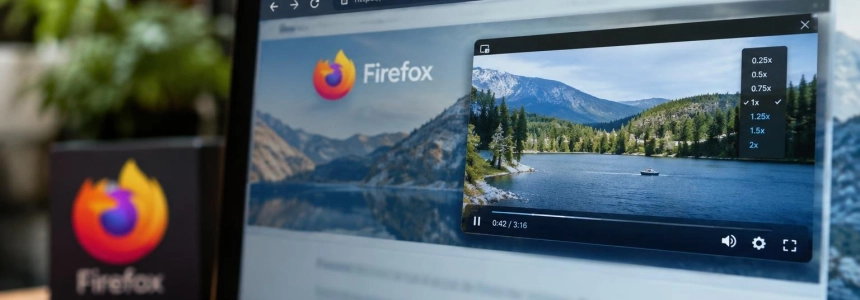
The new feature that directly affects the Picture-in-Picture player is a speed control ranging from 0.25x to 2.0x. According to the Firefox notes, the setting appears when the player window is medium-sized or larger; the button is not displayed in a smaller window.
The PiP player keeps the video separate from the rest of the page so it can remain visible while you browse. Firefox 160 expands on this idea with Mini Window, which is not limited to video: it also lets you pop an entire tab or a user-selected region out of a page. This is a separate feature from playback control, although both put web content in a floating window.
OMG! Ubuntu describes Mini Window as a beta feature and compares it to Picture-in-Picture applied to pages or parts of pages. In its release notes, Mozilla presents it as an early version and asks for feedback on Mozilla Connect as development continues. No date for a final release has been announced.
A tab or just the section you need
Mini Window has two modes: moving an entire tab or selecting an area of the page. To pop out a tab, right-click it, open the “Move Tab” menu, and choose “Move to Mini Window.” The page moves to a compact, resizable window that stays above other windows.
The window for an entire tab retains navigation controls and an address bar. OMG! Ubuntu notes that the bar and buttons hide automatically; It's FOSS describes controls for reloading, going back, going forward, returning the tab, and closing the window. The page can also adapt to the smaller surface.
To show only part of a page, Firefox offers “Move Section to Mini Window” when you right-click the page content. The browser lets you draw a box around the region you want to separate. You can also add the Mini Window icon to the toolbar and use it to choose between sharing the entire tab or selecting a section.
The tab is no longer in the main window while it remains in Mini Window, according to tests published by It's FOSS: you have to return it for it to reappear in the browser. Both modes can be moved and resized. In that outlet's tests, selection windows showed some limitations: sometimes they were too small, and resizing them properly was difficult.

An early feature with visible limitations
It's FOSS tested Mini Window on Linux with Firefox 160 and found that it requires a regular browser window with an open tab. It is not yet possible to create an independent Mini Window from scratch. The full-tab mode behaved like a small browser window, while the selection mode showed only the chosen area beneath the page address.
In those tests, sites such as It's FOSS, Wikipedia, and Associated Press switched to a compact layout when displayed in the small window. The result may therefore depend on how each page responds to the available space. The outlet found it useful to keep snippets of information visible during a research session, although it also noted some rough edges when resizing certain selections.
The feature joins other browser organization options that It's FOSS mentions for context: Containers, for keeping different types of browsing separate; Split View, for displaying two pages in one window; and Vertical Tabs, which moves the tab list to a sidebar. Mini Window adds another way to move content out of the main area without closing the page.
Other changes in Firefox 160
The update includes several everyday improvements. The address bar menu distinguishes searches from URLs: it shows “Paste and Search” when the copied text is a search term, instead of “Paste and Go.” It also lets you drag history entries from the sidebar to the tab strip to open them in new tabs.
Those who save pages as PDFs will find accessibility improvements: MathML mathematical content can be read by assistive technologies, including screen readers. Firefox also adds a “Never allow” button to block sites that insist on handling “mailto:” or other links; blocked sites can be managed in Settings.
Firefox can now play Matroska files with FLAC, MP3, or PCM audio. On macOS, WebGL content is now rendered with Metal, Apple's graphics API, a change that may improve performance on some sites. And Organize Tabs, within Smart Window, is now available in French: it can suggest groups of related tabs and name them in that language, through a gradual rollout.
The release also fixes several issues. Mozilla resolved a bug that could cause the first character typed quickly after clicking the address or search bar to be lost, and increased the contrast between the domain and the rest of the address. It also fixed pauses lasting several seconds when signing in to intranets with NTLM or Kerberos authentication, as well as issues with text selection and cursor placement in text fields.
On macOS, Firefox 160 fixes an issue where links opened in the background from other applications, such as RSS readers, brought the browser to the foreground. It also addresses simultaneous downloads that did not finish when the browser asked where to save files, files opening in an app other than the one configured in Finder, and altered filenames and PDF save flows when opening them in Preview from the print dialog. Mozilla also includes security fixes.
Web compatibility and contributions
SpeechRecognition comes to Firefox's Web Speech API, with real-time, on-device speech transcription in 40 languages. The browser also supports the legacy “::-webkit-input-placeholder” pseudo-element as an alias for “::placeholder,” improving compatibility with pages that use that selector to style field text.
In the release notes, Mozilla thanks those who made their first code contribution to Firefox 160: 22 were new volunteers. The list includes contributions from Ahmed ElGendy, Airat Makhmutov, Anton Bershanskyi, Austin Privatt, David Tamas, Davis Zeller-Pies, Felix Strüwe, Jack Boykin, James Bohan, kiasalehzadeh, Masanari Mizuno, Michał Fox, Mirko Kerezovic, Mohd Kamran Tahir, mozbugzilla.mushily885, python273, Rich Waters, Roberto Vidal, Seungmin Kim, Tin La, Willem Kaufmann, and Yohei Yamasaki. The notes link their names to the identifiers of the corresponding changes.
Availability and requirements
Firefox 160 was released on November 10, 2026 for 64-bit and 32-bit Windows, Windows ARM64/AArch64, macOS, 64-bit and ARM64/AArch64 Linux, Android, and iOS. OMG! Ubuntu noted that people with Firefox installed would receive the update when they launched the browser on Windows, macOS, or Linux with binary builds, or through the store or repository from which they installed it. On Ubuntu, the update would arrive in the background from the Snap Store.
Mozilla notes that Firefox no longer supports Windows 8.1 and earlier or macOS 10.14 and earlier, and recommends Firefox ESR for those systems. For Mini Window, Mozilla's stated next step is to gather feedback on Mozilla Connect and continue developing this early version; the notes do not set a date for general availability.
Sources: Firefox, OMG! Ubuntu, It's FOSS