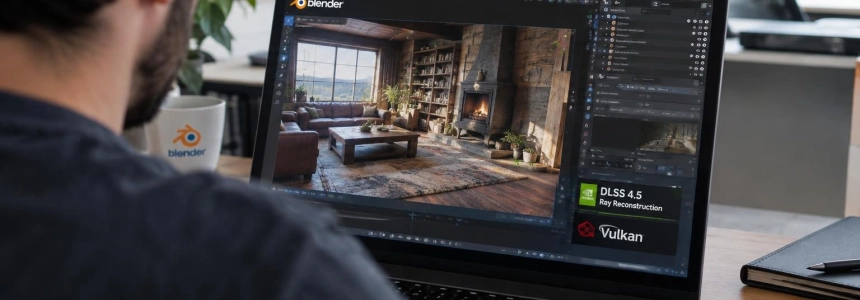
Blender 5.3 is now available, bringing DLSS 4.5 Ray Reconstruction to Cycles as a new denoiser and making Vulkan the default graphics backend. The update also adds native support for 3D Gaussian Splats, an optional project system, and major changes to the video editor. The Blender team released the version on November 10, 2026.
The most visible change for those working with lighting and material appearance is in the viewport: the DLSS denoiser can reconstruct a higher-quality image from samples and reuse data from previous frames. Blender presents the result as a cleaner, faster view during interactive work, with less flickering when playing animations. The feature requires an NVIDIA driver version 620 or later.
DLSS 4.5 comes to Cycles as a denoiser
Blender integrates DLSS 4.5 Ray Reconstruction into Cycles' denoising options. It is found in the Denoise panel, under the render properties and the Sampling section. It does not replace the entire rendering workflow: it is offered as an alternative for noise reduction and viewport reconstruction, alongside the existing options.
Blender's description notes that the system upscales the image and reuses samples from previous frames. This is intended to bring preview quality closer to that of the final render without sacrificing interactive responsiveness. The announcement promises less flickering between frames during animation playback, which is especially relevant when evaluating moving lights and materials.
Creative Bloq had reported in June that DLSS 4.5 would come to the Cycles renderer with Blender 5.3. The publication explained that NVIDIA's technology uses artificial intelligence to upscale lower-resolution images, and that Ray Reconstruction uses a transformer model to improve images in ray-traced or path-traced scenes. In Blender, the approach is intended to generate a lower-resolution view and upscale it so it approximates the usual image while using fewer computational resources than traditional methods.
The integration was announced before this release: Blender had demonstrated DLSS at SIGGRAPH 2025. Creative Bloq then reported Andrew Price's, also known as Blender Guru, reaction to a demonstration of the denoiser in Cycles:
Another SIGGRAPH exclusive Blender demo was Nvidia's DLSS denoiser for Cycles. It made moving around the viewport feel as smooth as EEVEE! Crazy stuff.
— Andrew Price, Blender Guru
The comparison with EEVEE refers to the smoothness of viewport navigation, not to Cycles and EEVEE becoming the same engine. Blender presents DLSS as a way to speed up visual evaluation while adjusting a scene, and notes one specific requirement: an NVIDIA driver version 620 or later is needed. The release notes do not specify which systems will see the same improvements or quantify the speed increase.
Vulkan becomes the default backend
The other major technical decision is the change in graphics backend. Blender 5.3 uses Vulkan by default instead of OpenGL, according to IT之家. The change applies to Linux and Windows, except for ARM devices on the latter system. The information published by Blender confirms that Vulkan is now the default option, but does not break down platform-specific details on that page.
IT之家 adds that the minimum required Vulkan version has been lowered to 1.1 and that some GPU and driver features are now optional. The stated goal is to broaden compatibility across different systems. The development team continues to optimize performance: published benchmark tests show improvements in several evaluated scenes, although results depend on the workload and graphics card used.
Therefore, the change is not a promise of better performance in every project. The specific information available is that some test scenarios improve, while actual performance varies depending on the work and hardware. Blender 5.3 also adds native support for NVIDIA RTX Spark devices running Windows 11, along with memory optimizations.
Gaussian Splats, projects, and new rendering controls
The release adds native support for 3D Gaussian Splats, a technique used to reconstruct 3D scenes from photos or videos. Blender can import this data from PLY, SPZ, and glTF files, store it as point clouds, process it using Geometry Nodes, and render it with EEVEE, Cycles, or Workbench in solid mode.
Splats are represented by a new point cloud type and specific attributes. These include scale, a vector representing size; rotation, a quaternion for controlling orientation; and radiance:base, which contains the base radiance of the splats followed by opacity. Radiance can also include spherical harmonics coefficients for bands of order one or higher.
By default, each Gaussian Splat is rendered using an emissive shader. The radiance attribute provides access to the resolved radiance at the current shading point. Blender also describes rudimentary support for relighting: the Emission node can be replaced with a hard-surface BSDF, such as Diffuse BSDF. The team cautions that performance is still being optimized and that rendering inaccuracies may occur because of differences between the sRGB color space used by many splat creation tools and Blender's linear color space, especially in areas with low opacity and high radiance.
For materials, Principled BSDF adds dispersion, which separates white light into color components to reproduce the rainbow effect seen in glass and gemstones. Blender says this feature corresponds to OpenPBR v1.1.1. Anisotropic roughness is also added to Glass BSDF and the transmission component of Principled BSDF, behaving similarly to the anisotropy of specular reflections.
EEVEE adds material lighting nodes to define how a material responds to the lights in a scene. The new nodes let users query light data—such as color, power, and position—evaluate position-dependent properties, and obtain a shadow mask. Light modes for Attribute and Light Space for Vector Transform are also added. Blender describes these controls as useful for both stylized shading, such as toon shading, and more complex physical effects, including iridescence.
The EEVEE engine also adds panoramic cameras with various projection types, including equirectangular, cubemap, fisheye, and mirror ball. The implementation still has limitations: it does not support depth of field, ray tracing, or volumetric temporal reprojection in the viewport.
Blender Projects is another new feature, but its use is optional. The system groups related files and resources and lets users manage settings for an entire project, both for individual and team work. It supports custom variables, asset libraries, and project-specific color management settings, as well as a dedicated splash screen. Project-specific add-ons and other extensions are planned for future releases, not this one.
The video editor gains ripple editing
The Video Sequencer gets a complete ripple editing framework, a rewritten Blade tool, and interface and performance improvements. Ripple mode automatically shifts subsequent strips when clips are inserted, trimmed, or deleted, maintaining timeline continuity without manually closing gaps. Editing operations consistently use Ripple, Shuffle, and Overwrite modes; users can switch between them while moving strips with the R, S, and V keys.
Ripple editing is rounded out with dedicated operations: Ripple Add inserts strips and reserves space on the timeline; Ripple Trim trims at the playhead and closes the resulting gaps; Ripple Delete removes the selection and shifts subsequent content. Blender assigns Shift+Q or Shift+W to trims from either side and Shift+X to ripple deletion.
The Blade tool now displays the cut as a line; Box Blade displays it as a region. Tooltips show the frame value at the cut point, and a real-time preview displays the frame beneath the cursor. Holding C temporarily activates Blade, and releasing it restores the previously selected tool.
The update also adds initial support for importing and exporting OpenTimelineIO, as well as hardware decoding and thumbnails for scene strips and other types. Blender does not specify in its summary of new features which formats or devices are covered by accelerated decoding. During playback, application performance can be up to twice as fast on GPUs, particularly with EXR sequences. The interactive compositor adds a playback cache, which can be enabled from the Options panel in the sidebar.
The Anisotropic Kuwahara filter also receives speed improvements: Blender says it is up to ten times faster on Apple GPUs, twice as fast on NVIDIA GPUs, and 25 to 30% faster on CPUs. The release also adds support for 17 Geometry Nodes in the compositor, including operations for bundles, math, and utilities.
More interface changes and requirements
In the Outliner, objects can now be arranged in a custom order, with an option to return to alphabetical order in the header's context menu. The sidebars in all editors let users search for properties and operators, including those in tabs created by add-ons. Use Ctrl or Cmd together with F to open the search; Alt or Option together with F clears it.
Comment nodes support Markdown formatting for annotating node trees. Blender also adds stackable compositing effects, such as Bloom, chromatic aberration, film grain, and vignette; each effect works internally as a node group and can be customized in the compositor editor. Asset libraries can be shared as extensions, and the Get Extensions platform lets users install public-domain assets, including a selection from Poly Haven.
Among the drawing improvements, Draw Mode adds Tweak, Lasso, Box, and Circle selection, as well as a Carver tool that cuts strokes and fills using Boolean operations. The Fill tool can fill multiple regions with a single stroke, and gradient fills now use a ColorRamp input instead of being limited to two colors.
IT之家 notes that Blender 5.3 is available for Linux, Windows, and macOS, and that macOS 13 Ventura or later is now the minimum requirement. Blender 5.2 LTS is the last release to maintain compatibility with macOS 11.2 and macOS 12. The new version also adds a USD collection importer—the only format supported for now—and hundreds of bug fixes, code cleanups, and refactoring changes.
Blender 5.3 thus brings rendering, graphics, and editing changes together in one release: Vulkan becomes the default option, Cycles adds DLSS 4.5 Ray Reconstruction, and the application introduces native workflows for Gaussian Splats. The team also identifies Blender on tablets and texture and animation layers as future development projects.
Sources: Blender, Creative Bloq, IT之家