Chrome 158 fixes six critical vulnerabilities as part of a package of 204 security fixes. The update reached the stable channel on November 17 for Windows, macOS, and Linux; an Android version is also available through Google Play. Google attributed two of the critical GPU and Media flaws to Xinyang Ge, an Anthropic researcher, with help from Claude.
Who should check Chrome
This applies to people using stable Chrome on Windows, macOS, Linux, or Android. The desktop update is rolling out over several days and weeks, so not all devices receive the patch at the same time. On Android, Google distributed Chrome 158.0.8127.42 through Google Play; it also began offering Chrome 159.0.8154.18 to a small percentage of users.
On desktop, the released versions are 158.0.8127.36/.37 for Windows and macOS, and 158.0.8127.36 for Linux. You don't need to identify which of the six flaws might affect you: the practical step is to check that Chrome has been updated. The vulnerabilities include memory safety bugs in graphics, multimedia, and other browser components.
| Platform | Released version | Distribution noted |
|---|---|---|
| Windows | 158.0.8127.36/.37 | Gradual rollout |
| macOS | 158.0.8127.36/.37 | Gradual rollout |
| Linux | 158.0.8127.36 | Gradual rollout |
| Android | 158.0.8127.42 | Google Play |
Google also began rolling out Chrome 159 to some Android users, with version 159.0.8154.18. The rollout to more users was expected in the following days. So the version shown may vary depending on the device and timing; don't assume that all phones have received that version yet.
Install the patch and confirm the result
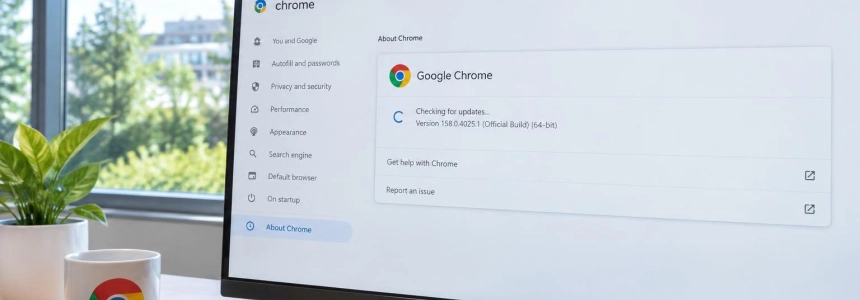
Open Chrome's information page. In the desktop browser, go to “About Google Chrome” from the Settings menu or the Help menu. Chrome will check for available updates and download any that apply.
Wait for the download to finish. Let Chrome complete the process started on that screen. The update may not be available for your device yet because of the gradual rollout; check again later if no download appears.
Restart the browser if prompted. Click “Relaunch” when the option appears to apply the downloaded update.
Return to “About Google Chrome.” Check the version shown by the browser after restarting it. On desktop, the versions released for this patch are 158.0.8127.36/.37 on Windows and macOS, and 158.0.8127.36 on Linux.
On Android, check Google Play. Search for Chrome in Google Play and check whether an update is available. Google released Chrome 158.0.8127.42 for Android through Google Play; version 159.0.8154.18 began reaching a small group before the rollout expanded.
If automatic updating gets stuck, check manually. Malwarebytes warns that Chrome can fall behind if the browser is never closed or if something, such as an extension, prevents the update from completing. Use the check in “About Google Chrome” and restart if prompted.
What the package fixes
The six critical flaws are related to memory safety bugs. They include out-of-bounds writes in GPU and ANGLE, a buffer overflow in Media, and use-after-free vulnerabilities in WebView, GarbageCollection, and WebAudio. Google rated these six issues as critical, the highest severity level in its classification.
The GPU vulnerability identified as CVE-2026-131031 is an out-of-bounds write. The package also includes high-severity fixes, many of them related to graphics, in addition to the critical flaws. Users don't need to change graphics options or disable features: the recommended action is to install the Chrome update.
There is a nuance in the attribution: Google credits two critical flaws to Xinyang Ge of Anthropic, with assistance from Claude. SecurityWeek reports that Google and Ge discovered 145 and 15 of the 204 vulnerabilities fixed, respectively. Anthropic, for its part, had published that Claude helped identify critical Chrome flaws and that the issues it reported were fixed through Chrome 156; that publication is not equivalent to a list of the six Chrome 158 flaws.
Mistakes to avoid
Don't assume Chrome has already updated. Automatic updating is the easy option, but the rollout is gradual and may be interrupted. Check the version in the browser itself rather than relying only on Chrome's usual automatic updates.
Don't confuse an announced version with an installed one. Google's release of a version doesn't mean it's already available on every device, especially on Android, where distribution is through Google Play and Chrome 159 started with a small group.
Don't forget to restart when prompted. Downloading the package and applying it are separate steps: use “Relaunch” if Chrome asks. Don't install extensions or third-party tools to address this alert either; check for and install the update from the browser or, on Android, through Google Play.
Google did not mention that these vulnerabilities were being actively exploited. Even so, the package includes 204 security fixes, and the published recommendation is to update as soon as possible. If a new version hasn't appeared yet, check Chrome again later.
Sources: Malwarebytes, Chrome Releases, SecurityWeek, Anthropic