KB5132057 refreshes Windows Search with a simpler list of results and actions that can be performed from Search, and brings a redesigned Run dialog to Windows 11. Microsoft has released the optional update for versions 25H2 and 26H2; several of its features will roll out gradually, so installing it does not guarantee they will appear right away.
Search that also performs tasks
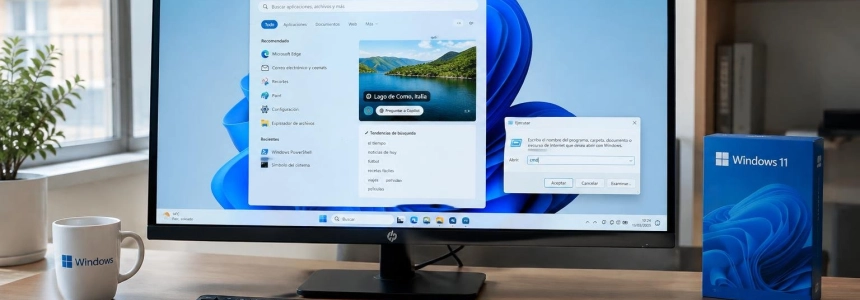
The main new feature is a search experience that brings together apps, documents, settings, and actions in a simplified list. Microsoft says the design improves performance and memory efficiency; it also lets you preview files and see details such as their location, who created them, and when they were last modified.
Search is no longer limited to finding items. From the search box, you can turn on features such as dark mode or Bluetooth, change brightness, mute the computer, or rearrange open windows without first opening Settings. The update also lets you get quick answers about the weather, actions, and some information directly in Search.
Results should be more tolerant of imprecise queries: Microsoft says Search is better at recognizing typos and synonyms. The new experience is initially available in English, a significant limitation for people who use Windows in other languages.
If an Android phone is linked through Phone Link, Search can also be used to call or message contacts and turn on options such as “Find my phone” and “Do not disturb.” Availability depends on the phone connection and the features Microsoft includes in the experience.
SoftZone attributes the new interface to WinUI 3 and notes that promotional content has disappeared from web results. IlSoftware.it adds that Microsoft uses a small machine-learning model running locally on the CPU to match requests with supported actions. According to that publication, this is not a chatbot that generates open-ended instructions: the system selects operations from a predefined catalog.
The Run dialog arrives with a toggle
The Run dialog, opened with Windows + R, gets a modernized interface, but it is not enabled by default. To try it, install the update and enable “New Run dialog” in Settings > System > Advanced. You can return to the classic dialog by turning off the option; Windows Latest says it is not possible to use both versions at the same time.
The new design supports dark mode and lets you type ~\ to go to the user directory, according to SoftZone and Windows Latest. The latter publication attributes an opening time of 94 milliseconds to Microsoft, compared with 103 milliseconds for the previous version. SoftZone also reports the 94-millisecond figure, but does not compare the two times.
Windows Latest says Microsoft worked on the feature with the PowerToys team and that the “Browse” button has been removed. According to the figure that publication attributes to the company, only 0.0038% of a sample of 35 million users clicked that button. Microsoft presented the redesign in May, but KB5132057 is the vehicle bringing it to Windows 11 now.
What else is changing in Windows 11
Windows Hello can temporarily brighten the screen during facial recognition to make signing in easier in dark rooms. The option is under Settings > Accounts > Sign-in options > Facial recognition (Windows Hello), under “Automatically adjust screen brightness during facial recognition.”
File Explorer also changes searches started from “This PC”: they now use the Windows indexer, like searches from File Explorer Home. Microsoft promises they will be faster and more consistent. IlSoftware.it notes that the benefit depends on the relevant locations being indexed.
For accessibility, if Sticky Keys, Filter Keys, or Toggle Keys is accidentally turned on, the notification lets you turn off the feature from the pop-up itself. Notification and sound settings remain under Settings > Accessibility > Keyboard > Notification preferences.
The update adds options for users with low vision: an indicator helps locate the pointer and can be turned on or off with Windows + Ctrl + Shift + X once enabled in Settings > Accessibility > Mouse pointer and touch. It also reduces the visible pointer lag during screen captures, for example when streaming games.
Magnifier adds a setting to choose whether Windows + Plus launches it—the shortcut is enabled by default—and a help menu with access to Feedback Hub. Narrator expands math reading to Greek, Hungarian, Indonesian, Norwegian Bokmål, Polish, Russian, Swedish, and Vietnamese. Live captions let you choose whether to transcribe system audio, microphone audio, or both.
In XBOX mode, the Gaming Task View navigation bar provides access to Quick Settings without leaving that mode. Windows can also notify you when an installed app includes a new widget and highlight that widget when you open the panel. In Settings, it is easier to find the benefits and services associated with your Microsoft account.
For businesses, web sign-in is being extended to devices that are hybrid joined to Microsoft Entra. On the lock screen, you can use a FIDO2 security key, a passkey on your phone, or a Temporary Access Pass. After signing in, Windows obtains a Kerberos ticket to maintain access to local shared resources and internal sites.
Microsoft also fixes issues in File History, which could fail to find backups when a drive was selected as the destination; in the connection between Windows Fax and Scan and fax servers; and in the activation of some Windows IoT Enterprise LTSC devices through KMS or TBA. The official list also includes fixes for Miracast connections with low resolution, passkey authentication errors between Android devices, and incorrect notifications that someone else was still using the PC when it was shut down.
On Arm devices with TPM 2.0 and a CRB interface, an issue that could prevent startup or cause TPM initialization errors has been fixed. The update also addresses an extra character at the beginning of Japanese text entered in RemoteApp and unexpected exits in Sage 50 Accounting when selecting options.
Versions, installation, and rollout
KB5132057 is a cumulative preview update, not a security patch. SoftZone and BleepingComputer describe it as a package with 28 changes; Microsoft released it on November 19, and media outlets reported its availability on November 20, 2026.
| Windows 11 | Build after installing KB5132057 |
|---|---|
| 26H2 | 26300.10075 |
| 25H2 | 26200.10075 |
To try it, open Settings > Windows Update and check for updates. If automatic downloads of the latest updates are not enabled, select “Download and install” under optional updates. It is also available in the Microsoft Update Catalog for manual installation or distribution across corporate networks.
The rollout of Search and many of the new features is gradual. Therefore, the new build does not guarantee that every feature will be available on every PC right away. Windows Latest says the changes in this preview will also be included in the December 8 update.
Microsoft will not release another monthly non-security preview in the second half of December, due to reduced activity during the holidays and the change of year. The usual monthly cycle will resume in January 2027. The support page also warns of a known issue on servers: SQL Server query connections to external databases may remain open and accumulate; Microsoft is working on a fix and offers affected organizations a mitigation through its enterprise support.
Sources: Windows Central, SoftZone, IlSoftware.it, Microsoft Support, BleepingComputer, Windows Latest