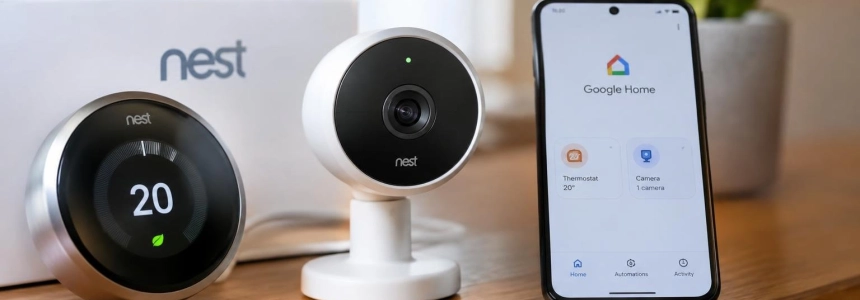
On January 25, 2027, Google will retire the Nest app on Android, iOS, TV, and the web; to keep controlling compatible devices, you'll need to use Google Home. The hardware will continue to work, but older Nest accounts must be linked to a Google Account before March 25, 2027, to prevent the account, its data, and subscriptions from being deleted.
The change affects people who use the Nest app or home.nest.com to manage compatible thermostats, cameras, doorbells, smoke and carbon monoxide alarms, or locks. Google says compatible devices and recent video history will automatically move to Home; clips saved in the web library, however, must be downloaded beforehand.
Check which account and devices you have
The first thing to check is your sign-in. Google says people who started using Nest after August 19, 2019, already sign in with a Google Account and don't need to migrate. If you use a separate Nest password, you still need to link your account.
Test your sign-in in the Nest app. On the sign-in screen, tap “Sign in with Google”: if your home appears, your account is already linked. If you use “Sign in with Nest” and a Nest-specific password, you'll need to complete the migration to Google from the app settings. Do this before January 25 to keep access after Nest shuts down; the deadline to avoid account deletion processing is March 25.
Check whether your equipment is compatible with Google Home. Google includes these models and categories on its list:
Category Compatible devices listed by Google Thermostats 3rd-generation (2015) and 4th-generation (2024) Nest Learning Thermostat; Nest Thermostat E (2017); Nest Thermostat (2020); 1st- and 2nd-generation Nest Temperature Sensor. Cameras and doorbells 1st-generation wired Nest Cam Indoor and Outdoor; Nest Cam IQ Indoor and Outdoor; Nest Hello; Nest Hub Max camera; Nest Cam and doorbells released in 2021 or later. Smoke and CO detector 2nd-generation Nest Protect, wired or battery-powered, until the expiration date printed on the device. Lock Nest × Yale with Nest Connect. Install Google Home and sign in with a Google Account. Google says the app is available on Google Play Store and App Store. If you already have a Google Account linked to Nest, sign in with it; a Google Account is required to use Home.
Save what won't transfer
Not all videos will follow the same path. Recent camera history, including event recordings and 24-hour history, will automatically transfer to Google Home starting January 25. It will remain available until it expires, which Google says is after 30 or 60 days. The library of saved clips in the Nest web version will not be copied.
Download any clips you want to keep before January 25. Go to home.nest.com and click “Download all” to save the library videos to your computer. Don't wait for the automatic migration: it covers recent history, not clips saved in the web library.
Check access after the transfer from Google Home. Once the cameras have migrated, Google also lets you view the live stream, browse history, and download clips up to five minutes long at home.google.com. If the camera appears but you still can't review the timeline or previous events, TechRepublic notes that the transfer may not be complete yet; check again later.
What will happen to your account and subscription
March 25, 2027 is the deadline for migrating an older Nest account. Google says you can download or delete your data until then; afterward, it will begin processing the deletion of unlinked accounts, along with their data and subscriptions. Don't confuse this deadline with the app shutdown: starting January 25, you will no longer be able to view or control devices from Nest or home.nest.com.
Compatible devices will automatically appear in Google Home once the account is linked. Google specifies that you don't need to scan QR codes again. First-generation Nest Aware subscriptions will also transfer automatically: according to the company, they will move to Google Home Premium Advanced starting January 25, at no extra cost.
Confirm access for people who share your home after the transition. TechRepublic recommends checking in Google Home who can view cameras, control devices, and receive alerts; it also warns that you may need to invite some people again. Also check the notifications you typically use.
Handle the voice assistant change separately if you also have Google smart speakers or displays. The Nest retirement is a separate transition: Google has set August 2, 2027, as the date when Gemini will replace Google Assistant on those devices. There's no need to confuse that timeline with the migration of cameras, thermostats, or locks.
Mistakes that could leave you without access or videos
Don't wait until March 25 to prepare for the change. Nest access ends on January 25; the March deadline applies to migrating older accounts and the start of deletion processing.
Don't assume your clips are saved just because your camera history will move to Home. Download separately any videos from the web library that you want to keep: Google says they won't transfer.
Don't uninstall or reconfigure the hardware because the app is closing. Google says the change affects the app, not compatible hardware, and that linked devices will appear automatically. You also don't need to scan QR codes again.
Don't confuse compatibility with remote access. Devices will continue to work at home, but after the shutdown you won't be able to view or control them from Nest; you'll need to use Google Home with a Google Account to manage them.
If you still sign in with a separate Nest password, the priority is to link that account to Google before the January 25 shutdown; afterward, check that your devices and history appear in Home.
Sources: Computer Hoy, Google Home and Nest Help, Android Central, TechRepublic, Digital Trends