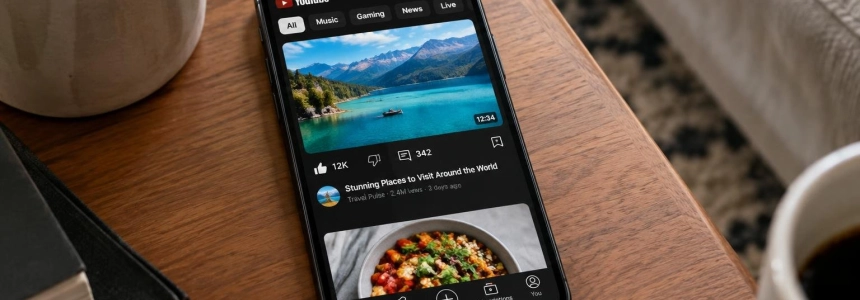
YouTube is rolling out a version of Home on Android and iOS that lets users like a video without opening it. Beneath each regular video's thumbnail are shortcuts to like it, view its comments, and save it; the change makes these actions easier, but also makes it possible to tap the Like button by accident while scrolling through the feed.
Quick actions beneath each thumbnail
The row appears on the Home screen, without needing to open the video's page. Save adds the video to the Watch Later list; Comments lets you see what people are saying about it. The third shortcut, Like, records your reaction directly from the feed. The three-dot menu remains to the right of Save, with options such as casting, sharing, and reporting.
The design changes when users can interact with a video: they no longer need to play it to leave a positive signal or check the conversation. That convenience has an immediate downside on a screen navigated with the thumb. Digital Trends describes the Like button as easy to tap unintentionally; Absolute Geeks notes that it sits right where a finger might land while scrolling.
The Like button is a bit awkward, as you can easily end up tapping it by mistake while scrolling.
— Digital Trends
An accidental Like does more than change a button's state: Digital Trends warns that an unintended tap could influence future recommendations. Absolute Geeks also notes that likes are among the signals YouTube uses to decide what to recommend. The publications do not detail how the platform weighs each interaction or what effect a single tap might have; they do agree that the action can be recorded without watching the video.
A Home feed with more formats and edge-to-edge Shorts
The action row is part of a broader reorganization. In addition to regular videos, the feed now brings together ads, playlists, photos, community posts, and Playables. Shorts appear in groups of four between videos, without the side margins they had before: the blocks take up the full available width.
Digital Trends reports a Reddit user's concern that mixing image posts, regular videos, and Shorts could make it easy to open one of the latter by mistake and keep scrolling for hours. Absolute Geeks describes a similar impression: when formats look alike in the feed, it can be harder to tell what kind of content you are about to open.
The setting to reduce the presence of Shorts is available in the app. The Shorts limit can be set to zero minutes in Settings, under Time management. According to Digital Trends and Tbreak Media, this choice hides Shorts shelves on Home and the Shorts tab; Tbreak clarifies that it does not remove them from every part of the app.
Shorts from channels you subscribe to still appear in Subscriptions, and shared links continue to open. Digital Trends adds that with the limit set to zero, you can no longer keep scrolling to discover new recommended Shorts; Tbreak explains that the measure does not prevent you from watching one received through a link from a social app.
The change follows the move of Subscriptions
The new interface follows another adjustment to the same screen: YouTube moved Subscriptions from the bottom bar to the top of Home. Digital Trends reports that many viewers reacted negatively to that change. The sequence of changes gives Home a more prominent role in mobile navigation, although YouTube has not officially announced this redesign.
The interface is appearing through an app update. The versions listed are 21.47.483 on Android and 21.47.6 on iOS. Tbreak Media says Android Authority was the first to spot the buttons on both platforms. For now, there is no option to return to the previous design, according to all three publications.
| Platform | Version with the redesign |
|---|---|
| Android | 21.47.483 |
| iOS | 21.47.6 |
A quicker reaction, and an easier one to trigger
Absolute Geeks sees the new row as a way to reduce steps: you can save a long video for later or check its comments without opening it. It also compares the gesture to those on other social networks, where people often react to a post as soon as it appears. That is the publication's interpretation; YouTube has not publicly explained the redesign's purpose.
For anyone who just wants to save a video or read its comments, the options are close at hand. For anyone who scrolls quickly through Home, the Like shortcut introduces another opportunity for accidental interaction. The other actions mentioned—such as casting, sharing, or reporting—remain grouped in the three-dot menu next to Save.
The open question is whether the shortcut row will make Home easier to use or whether mistaken taps will end up liking videos the user never even played. For now, the app does not let users restore the previous appearance.
Sources: Digital Trends, Tbreak Media UAE, Absolute Geeks UAE | Tech, Gaming, Entertainment News & Reviews in UAE