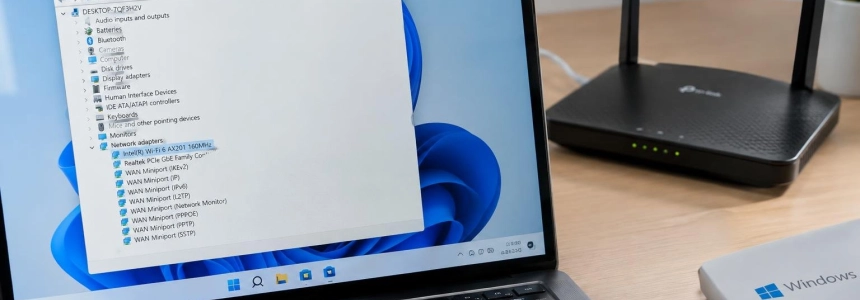
A Wi-Fi driver failure can bring down all of Windows 11 with a blue screen. Microsoft wants to reduce that risk by moving those drivers out of the system kernel and into user mode in 2027, according to Windows Latest, which attributes the plan to company documents and a presentation at Ignite 2026.
The change is not limited to wireless connectivity. Microsoft is expanding its work on driver quality and resilience: it wants to reduce the amount of code running in the kernel, more rigorously review its partners’ drivers, and remove drivers that do not meet a sufficient quality bar from Windows Update. The company also plans new protections for those that must remain in this central part of the system.
A Wi-Fi driver can affect the entire system
Drivers allow Windows to communicate with hardware, from graphics cards to network adapters. Drivers that run in kernel mode have access to vital areas of the system; as a result, an error in one can become more than a local device problem and cause a Windows crash.
Computer Hoy reports that users have described Wi-Fi issues for years after installing Windows 11 updates. Reported symptoms range from losing the signal to system crashes and blue screens. Windows Latest adds that driver compatibility issues have led Microsoft to pause feature updates for certain devices.
The proposal is to run Wi-Fi drivers in user mode, an environment with fewer permissions that is separate from the kernel. If the driver fails, Windows should be able to keep the rest of the system running. Mehmet Kucukgoz, Windows product manager, explained at Ignite 2026:
“When a user mode driver faults, the kernel and the rest of the device keep running. That’s the key, right?”
— Mehmet Kucukgoz, Windows product manager
Isolation does not mean that all failures will disappear: the goal Microsoft and Windows Latest describe is to ensure that a driver failure does not necessarily bring down the operating system. User-mode execution is already used for some hardware categories, but Microsoft wants to extend it to more types of devices.
The quality initiative goes beyond Wi-Fi
Windows Latest places the plan within the Driver Quality Initiative (DQI), which Microsoft introduced at the Windows Hardware Engineering Conference in May 2026. The event brought together manufacturers such as AMD, Intel, and Nvidia, and was held after an eight-year break, according to the outlet. Ignite 2026 session THR892, presented by Kevin Sullivan and Kucukgoz, covered the initiative and collaboration with technology partners.
The DQI has four areas of focus. Windows Latest explains how Microsoft links driver architecture with partner trust, driver maintenance throughout their lifecycle, and measuring their quality in real-world use.
| Pillar | What Microsoft proposes |
|---|---|
| Architecture | Modernize the driver model and reduce the number of drivers running in kernel mode. |
| Trust | Raise requirements for drivers and for those permitted to submit them. |
| Lifecycle | Keep drivers updated and maintainable throughout their lifecycle. |
| Measurement | Evaluate quality based on customers’ experience. |
The plan also covers partner verification, more automated checks, and changes to the Windows Hardware Compatibility Program requirements. Microsoft wants to improve the Windows Update catalog by removing outdated or low-quality drivers and use data to investigate issues. The evaluation will include stability, performance, features, battery consumption, and thermal impact.
The company had already outlined broader goals in its Windows Resiliency Initiative. In a November 2025 announcement, Microsoft said it would expand its driver resilience approach beyond antivirus software and that it expected to significantly reduce kernel-mode code in categories such as networking, cameras, USB, printers, batteries, storage, and audio.
Why changing the execution mode is not enough
Wi-Fi drivers have traditionally run in kernel mode because of performance and hardware access requirements. Windows Latest lists lower latency, network traffic management, and processing incoming and outgoing packets among the reasons; it also notes that the driver must communicate directly with the wireless adapter.
Switching between kernel mode and user mode can add overhead, and some manufacturers have kept drivers in the kernel for that reason. Microsoft, however, wants to expand support for the user-mode driver framework (UMDF) without sacrificing performance. Kucukgoz mentioned direct memory access (DMA) as a way to make the model viable for more hardware categories.
Windows Latest lists sensors, biometric fingerprint readers, USB, Ethernet, and HID, among others, as examples of categories currently compatible with UMDF. Kucukgoz said at Ignite that Microsoft is expanding support to more types of devices. The session also linked this progress to DMA, which allows devices to access system memory without the CPU managing every transfer.
Not all drivers will be able to move out of the kernel. Microsoft acknowledges that some will not be able to switch to user mode, especially for performance reasons. In its 2025 post, the company cited graphics drivers as an example; they will remain in kernel mode for performance reasons.
More safeguards for drivers that remain in the kernel
For those cases, Microsoft is working on security-focused compilation options, driver isolation, safer APIs for accessing memory, and DMA remapping. The idea is to limit the scope of a failure and restrict a driver’s access to memory, even when it has to run in kernel mode.
On its Windows blog, Microsoft described practical safeguards for containing failures: mandatory compiler protections, DMA isolation, and remapping. Kucukgoz also discussed specific APIs for safer reads and writes to user-mode memory. The ultimate goal, in the product manager’s words, is to reduce third-party drivers in the kernel, failures, and attack vectors, as well as make driver maintenance safer.
The change is part of a shift Microsoft had already begun applying to antivirus drivers. Its blog says that, since June 2025, the company has offered a private preview of an endpoint security platform that moves antivirus policy enforcement from the kernel to user mode. It also notes that, as of April 1, 2025, version 3.0 of Microsoft Virus Initiative introduced new requirements for antivirus partners to retain their driver signing rights.
BleepingComputer linked the DQI to the work of the Windows Resiliency Initiative and reported AMD’s position on shared responsibility for driver quality. David Harmon, AMD’s director of software engineering, said: “It’s a shared commitment”. The outlet also cited collaboration between Microsoft and AMD to improve security, stability, and performance predictability.
What users can do when faced with a blue screen
The move of Wi-Fi drivers is planned for 2027; it is not a solution available now. If a computer is already showing a blue screen, Computer Hoy recommends noting the error code before looking for the cause. Examples it mentions include DPC_WATCHDOG_VIOLATION, SYSTEM_THREAD_EXCEPTION_NOT_HANDLED, and MEMORY_MANAGEMENT, which may be related to outdated or incompatible drivers, RAM problems, or graphics failures.
To enter Safe Mode, Computer Hoy gives the path Settings, System, Recovery, Advanced startup, and Restart now. You can also hold down the Shift key while selecting Restart from the Start menu; then choose Troubleshoot, Advanced options, Startup Settings, and Restart, and press F5 for Safe Mode with Networking.
Windows Latest confirms that the plan to move Wi-Fi drivers was announced in an Ignite 2026 session. Kucukgoz said Microsoft is currently working on the change and that it will be released in 2027.
Sources: Computer Hoy, Windows Latest, Tech Hub, Windows Experience Blog, BleepingComputer