Google Ads is giving AI Max more decisions about matching, ad copy, and destinations in Search campaigns. The automatic migration of campaigns using automatically created assets or campaign-level broad match began in September 2026; the migration of dynamic search ads (DSA) is scheduled for February 2027. Google says the updates are intended to preserve legacy settings, but active features vary by campaign.
Who should review their campaigns
The audit applies to those managing Search campaigns with automatically created assets, campaign-level broad match, or DSA, as well as those who have already enabled AI Max. Don't assume that two campaigns with AI Max enabled automate the same things: Google links migrated settings to the legacy feature each campaign used.
For reference, Google says that campaigns migrated from automatically created assets have search term matching and text customization enabled. Those migrated from campaign-level broad match have term matching enabled. For DSA, the planned migration enables term matching, text customization, and final URL expansion, while preserving legacy URL controls.
| Legacy setting | AI Max features specified for migration |
|---|---|
| Automatically created assets | Term matching and text customization |
| Campaign-level broad match | Term matching |
| Dynamic search ads | Term matching, text customization, and final URL expansion |
The table summarizes the default settings described for migrations; it does not replace reviewing each campaign. Google Ads lets you view AI Max at both the campaign and ad group levels. At the latter level, term matching can be turned on or off, but the feature must also be enabled in the campaign.
Steps to conduct the audit
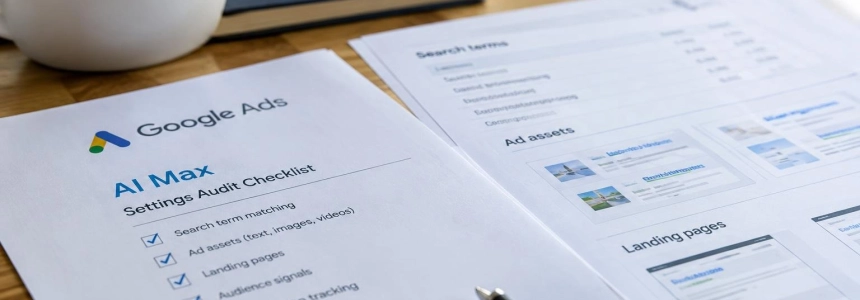
Take inventory before changing anything. In Google Ads, open the Campaigns menu, go to Settings, and select a Search campaign. In the campaign section menu, open AI Max. Note whether it is enabled and which options are active: term matching, text customization, and final URL expansion. Repeat the check for campaigns that have migrated or have different settings.
Check the ad groups too. In the Google Ads menu, go to Ad groups and select Search term matching. Check which groups have it enabled or disabled. A campaign-level setting isn't enough to know what's happening in each group; also, the group-level option only applies if matching is enabled in the campaign.
Review the search terms report. Look for report fields that identify the match type and source to distinguish traffic associated with AI Max. Compare queries with the campaign's intent: watch for informational or comparison searches, competitor terms, and brand queries that shouldn't be included in a non-brand campaign. Compare cost and conversions with your usual traffic; don't assume that an exact match keyword alone limits queries to its original target.
Evaluate queries based on their business value. Don't automatically dismiss a new search just because it hasn't converted yet. For lead generation campaigns, assess lead quality and, if you have the data, whether leads progress to opportunities or customers. For ecommerce, review revenue, ROAS, margin, and products sold, not just the number of conversions. The Smarter Ecommerce research cited by Search Engine Journal found variation across campaigns; its data is no guarantee of results for any particular account.
Inspect generated text and its performance. Text customization can create headlines and descriptions based on ads, keywords, and landing page content. Check that each asset accurately describes the offer, product, and price; also check whether the message fits the audience and which assets receive spend or generate conversions. Google lets you review and remove generated assets, and offers text guidelines controls to guide the message.
Verify the pages receiving traffic. With final URL expansion enabled, Google may choose another page on the site to respond to a query. Check the landing page and search terms reports: make sure each destination has an appropriate conversion path and matches the ad's offer. If there are pages that shouldn't receive paid traffic, Google offers campaign-level URL exclusions; it also allows ad group-level inclusions.
Protect ads with pinned text. Google warns that pinned assets in responsive search ads may not be respected when final URL expansion selects another page; the same applies when using URL inclusions. If you need to always keep those assets—for example, due to pricing terms or approved messaging—Google recommends turning off final URL expansion and URL inclusions.
Test one decision at a time. If you want to measure the effect of expanding matching, customizing text, or enabling final URL expansion, structure the test around that feature. Google offers experimentation tools for AI Max, although eligibility depends on the campaign. Changing several options at once makes it difficult to identify which setting explains a performance change.
Prepare DSA campaigns in advance. Google expects active DSA campaigns to be automatically converted into standard ad groups with AI Max enabled in February 2027. Before then, review dynamic targets, URL exclusions, and query performance. During the update, some unsupported legacy targets may become read-only.
What to do if you need to change a setting
To modify an existing campaign, Google Ads gives this path: Campaigns > Settings > select the campaign > AI Max. There you can enable the feature and choose its options; save your changes when you're done. To edit multiple campaigns, in Settings select the campaigns and use Edit to change AI Max settings or asset optimization.
To exclude a page, open Settings in the Campaigns menu, select the campaign, and expand AI Max. With AI Max enabled, under Final URL expansion, choose Add URL exclusions, add the URLs or rules, and save. Exclusions require text customization and final URL expansion to be enabled.
Costly mistakes to avoid
Don't change all the controls at once. Turning off AI Max or imposing restrictions on all campaigns can remove useful options without proving that they're hurting the business. Start with campaigns where budget, lead qualification, or messaging requirements make automation more sensitive.
Don't confuse more conversions with more value. Google reported an average of 7% more conversions or conversion value for non-retail advertisers using the full set of features, compared with using term matching alone. This is Google's internal data, not a promise for every account. Evaluate your own costs and business results.
Don't assume pinned text is guaranteed when final URL expansion or URL inclusions are active. And don't put off reviewing DSA destinations and targets: automatic migration is scheduled for February 2027, while Google is already applying migrations for other legacy features.
Sources: Search Engine Journal, Google, Google for Developers, Google Ads Help