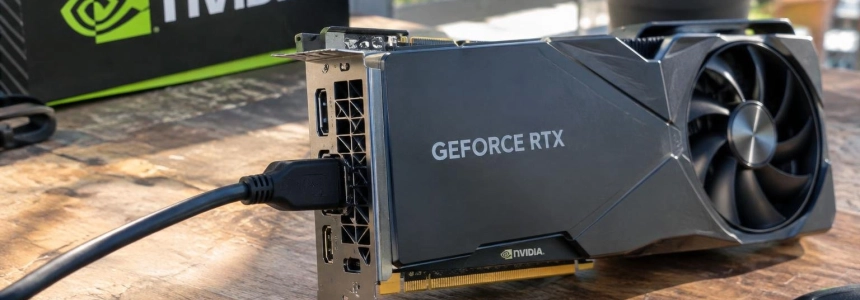
After installing the GeForce Game Ready 621.40 driver, users with RTX 50 cards have reported black screens on startup, signal loss, and failures to detect external monitors. Nvidia released the version to fix, among other issues, repeated driver writes to the SSD; Wccftech notes that recent complaints are focused on HDMI, DisplayPort, and USB-C outputs.
Who may be affected and what signs to look for
The situation described mainly affects RTX 50 users who installed 621.40 and then began experiencing video output problems. Symptoms include a black screen during startup, intermittent DisplayPort signal loss, and external monitors that do not wake up or appear when connected via USB-C or DisplayPort.
A user with an RTX 50 GPU described the issue when connecting an external display:
“About 50% of the time the external monitor doesn't come up at all when I plug in the USB-C/DP cable, and I have to replug or reboot.”
— RTX 50 GPU user
Wccftech also reports complaints from users with multiple monitors: in certain setups with an HDR display connected via DisplayPort and an SDR display connected through a passive DisplayPort-to-HDMI adapter, some saw flashes of color noise on the secondary display when the GPU memory downclocks at idle. This is a different symptom from losing the signal; note which one occurs and on which display.
The practical clue is the timing: the problem began after updating. If you do not have an RTX 50, or the issues were already occurring with another driver, these reports alone do not establish that 621.40 is responsible. Wccftech also mentions that some multi-monitor issues had already appeared with versions 621.14 and 621.24.
What to do if you have installed 621.40
Confirm which version is installed. Check the graphics driver version in the NVIDIA information available on your system and note it before changing anything. If you have 621.40 and the displays started failing after installing it, also record which connection you use—HDMI, DisplayPort, or USB-C—whether the problem occurs at startup or when connecting a monitor, and whether it affects one or multiple displays. This comparison helps determine whether the symptom recurs after changing the driver.
First try a simple reconnection. If an external monitor does not appear, unplug and reconnect the cable. A user cited by Wccftech said they had to do this or reboot to get the display back. If the interruption occurs over DisplayPort, another user said that turning the PC off and back on restored the signal. These are temporary measures described by users, not a guaranteed fix for every case.
Consider rolling back to an earlier driver if the issues continue and began with 621.40. Wccftech recommends that RTX 40 and RTX 50 users run Display Driver Uninstaller (DDU) from Windows Safe Mode and roll back to version 617.42. This is that outlet’s recommendation, not confirmation from Nvidia that 617.42 is suitable for every system. Before doing so, verify that the driver package matches your system and graphics card.
Follow DDU's instructions carefully. Wccftech suggests running the tool in Windows Safe Mode to remove the driver and then installing an earlier version. If you do not know how to enter Safe Mode or complete the reinstallation, do not improvise with options you do not understand: check the tool's and Windows' instructions before proceeding. The article does not specify a menu path or exact configuration steps, so it is best not to make them up.
Check the result before considering the issue resolved. After changing the driver, repeat the situation that triggered the issue: a cold boot, connecting the external monitor, or using the affected displays. Check whether the signal returns and whether the color flashes persist. Wccftech reports one user who rolled back from 621.40 to 610.88 and restored DisplayPort functionality; that account does not prove that 610.88 will fix the problem on other systems.
Avoid updating again automatically. PC Gamer reports that 621.40 fixed the repeated SSD write issue that had not been resolved by the previous 621.35 hotfix. At the same time, Wccftech reports new complaints about video signal issues. If your system works well with an earlier driver, weigh these two factors before installing 621.40 just because it is newer.
Mistakes to avoid
Do not attribute every black screen to the driver without checking when the issue began. The reports concern specific symptoms after updating, but they do not prove that every display problem has the same cause. Note the version and connection type before uninstalling or changing software; this will help you keep track of which change coincided with the issue.
Also, do not assume that 621.35 is a safe alternative just because it is older. PC Gamer explains that the hotfix reportedly did not eliminate the repeated SSD writes, while Wccftech also reports complaints about that driver. The issues described are different: do not assume that fixing one will resolve the other.
Finally, do not treat the recommendation to roll back to 617.42 as a universal guarantee, and do not install a package without verifying that it matches your system. The version recommended by Wccftech is guidance for those experiencing these issues, not an individual diagnosis. If signal loss continues after rolling back, the available reports do not identify what other component or configuration is causing it.
The immediate decision depends on one specific check: if you have 621.40 and the issue appeared afterward, try reconnecting the monitor to see if the image returns and consider the suggested rollback, bearing in mind that other users have reported different results.