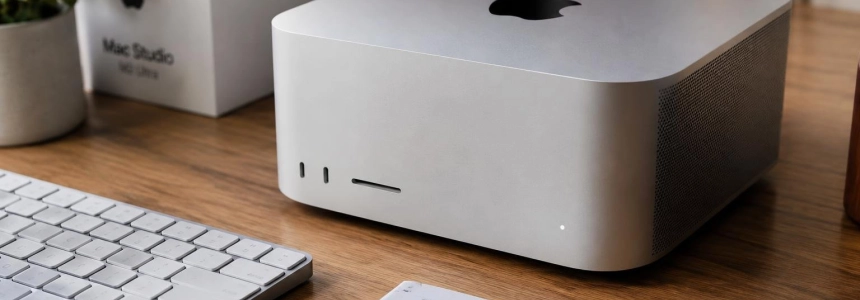
The 256 GB Mac Studio M5 Ultra costs 16,329 euros in the configuration tested by Xataka, and its reviews depict a machine capable of running enormous local models, but difficult to recommend outside professional workloads. Xataka spent more than a month testing it with artificial intelligence; WIRED and Tom’s Guide also evaluated the machine, although they focused their tests on different tasks.
- Manufacturer: Apple
- Processor: Apple M5 Ultra
- Unified memory: 256 GB
- Storage: 8 TB SSD
- Operating system: macOS 27 Golden Gate
- Price: 16,329 euros in the configuration tested by Xataka
A workstation aimed at local AI
The M5 Ultra combines a 36-core CPU and a GPU with up to 80, according to the specifications published by Xataka. Its 256 GB of unified memory can load models that do not fit in the graphics memory of many consumer cards, and its bandwidth reaches 1.2 TB/s. Apple presents the machine as a device for on-device AI and professional workflows; the reviews put that promise to the test from different angles.
The chip architecture is the most significant new feature for AI workloads: Xataka explains that the M5 Ultra brings together four pieces of silicon and adds Neural Accelerators to each graphics core. WIRED also notes that it is Apple’s first chip made up of four dies and that the accelerators boost these tasks. In Xataka’s tests, the MLX framework processed prompts between 1.35 and almost twice as fast as llama.cpp, although generation speed depended on the model and engine.
The exterior design, by contrast, has barely changed. Tom’s Guide praises the compact form factor and the six Thunderbolt 5 ports on the Ultra model; Xataka also lists Wi‑Fi 7, Bluetooth 6, 10 Gbps Ethernet, and an SDXC slot. WIRED notes that it retains two USB-A ports, as well as Thunderbolt 5, HDMI, and a headphone jack.
What they found with models, agents, and games
Xataka’s most concrete test was a programming project run by the OpenCode agent. With Qwen3.8-27B and MLX, the system completed the task in a median of 8 minutes and 12 seconds and passed all 13 evaluation tests in each of its three runs. A setup with Qwen3.5 122B-A10B was faster, with a median of 5 minutes and 55 seconds, but did not pass every test on every attempt: generating tokens quickly did not guarantee better results on the task.
Speculative decoding also changed the timings. Xataka recorded a median of 4 minutes and 51 seconds with Qwen3.8-27B using Splash and DFlash2, although the number of tests passed varied between runs. In generation measurements, that same system reached 93.7 tokens per second for prose and 214.5 when writing code. These results are for a specific configuration, not a uniform speed for every model or task.
WIRED tested a file-summarization task with LM Bionic and a Qwen 3.5 model with 9 billion parameters: it finished in two minutes, compared with almost ten on a MacBook Pro M5 Max. With a 122-billion-parameter version, the task also took less than two minutes, with results WIRED described as more accurate and useful. The magazine thus highlights the ability to work offline without sending content to the cloud.
Games offer another perspective on the machine’s power, but they were not the shared focus of the tests. WIRED measured Cyberpunk 2077 at 160 frames per second at a resolution of 2560 × 1400 and Ultra settings, while Tom’s Guide got 77 fps in Cyberpunk 2077 at 4K and high settings. The conditions are not the same, so these figures do not allow for a direct comparison. Tom’s Guide also found solid results in games optimized for Apple Silicon, although its Alienware desktop outperformed the Mac in two of the three titles compared.
“It felt very much like using a frontier-class LLM right on my computer, completely offline and without accessing the cloud.”
— WIRED
Heat, fans, and the bill
The reviews disagree on thermal performance. Xataka recorded temperatures of up to 79.8 °C on the GPU during an eight-hour continuous test and heard the fans under load; it described them as audible in a quiet room, though not deafening. During that session, the machine handled 2,313 requests without errors and maintained virtually the same speed from the first hour to the last.
WIRED also noticed heat and loud fans during its AI tests, and recommends leaving space behind the machine because it expels hot air. Tom’s Guide, by contrast, says the Mac Studio ran cool and quietly even while gaming or rendering video; according to the review, its vents barely got warm. There is no shared conclusion on thermals: the workloads and observations differed across publications.
The purchase price is the weak point that appears in all three reviews. Xataka considers its 16,329-euro configuration worthwhile for a niche that runs large models locally and intensively, and warns that it is not an economical alternative to the cloud for occasional use. WIRED describes the machine as highly specialized; Tom’s Guide also calls the price steep and suggests that a Mac mini is enough for everyday tasks.
Agreement on the niche, differences in the experience
All three reviews agree on its power and that the price puts the M5 Ultra beyond the reach of much of the public. Xataka sees its main value in its memory and ability to run large models locally, but notes that the configuration requires time to choose and tune engines, models, and parameters. WIRED emphasizes the experience of using a large model offline, while Tom’s Guide gives more weight to CPU performance, gaming, and the compact design.
The clearest disagreement concerns temperature and noise: Tom’s Guide found it cool and quiet; WIRED and Xataka did notice heat and fans under intensive workloads. The verdict also changes depending on the use case: Xataka says the investment only makes sense in very specific situations; WIRED considers it a unique option for local AI, and Tom’s Guide recommends it to those who need professional-grade power. The 256 GB configuration tested by Xataka costs 16,329 euros.
Sources: Xataka, WIRED, Tom's Guide, Apple Newsroom