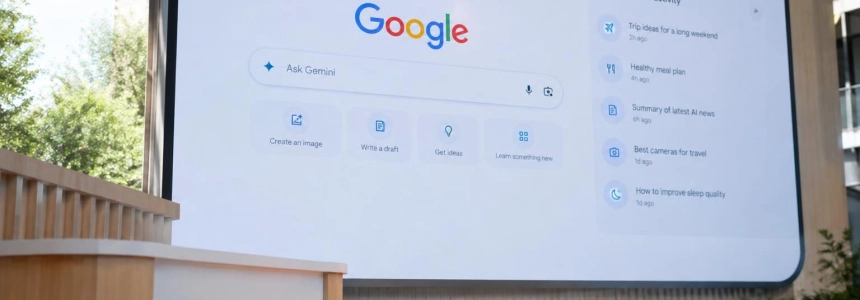
Google is removing the “Search with Google” button from its desktop homepage and replacing it with shortcuts to AI tools. Traditional search is not going away: when users type a query and press Enter, they still reach Search results. The change is what the page invites them to do before searching.
The new buttons—“Create images,” “Ask about files,” and “Brainstorm”—lead to Gemini features that were previously available on other surfaces or in the attachments menu. “I’m Feeling Lucky” remains alongside them. The homepage keeps its central search box, but no longer presents web search as its only prominent action.
A homepage that suggests tasks, not just queries
The image creation shortcut opens Nano Banana, the image generation tool that is also available in the Gemini app, Google AI Studio, and AI Mode in Search. “Ask about files” lets users analyze a document, rewrite it, answer questions, or request tasks such as polishing a résumé and drafting an email with action items. Brainstorm invites users to describe a goal, from organizing tasks to learning to code.
The design changes the first step: instead of necessarily starting with an open-ended query, the page suggests specific actions with Gemini. For businesses and product developers, the visible shift is not the introduction of a new technical capability, but Google placing generative features at Search’s entry point. The same family of tools is already integrated into products such as Gmail, Docs, and Pixel phones, as well as third-party apps such as Adobe, Shopify, OpenTable, and Instacart, according to CNET.
The new layout also clearly separates AI shortcuts from conventional search. Hardware Upgrade reports that pressing Enter after typing a query still shows the usual results; AI Mode is activated only when users choose it. This distinction limits the immediate scope of the change: Google is changing the visual hierarchy and offering new paths, but it is not turning every search into an automatic conversational answer.
The sidebar turns search into an ongoing session
The most structural change is an sidebar with recent AI searches, which Google is rolling out globally on desktop. It lets users revisit conversations, start new ones, and return to an earlier exploration. The Decoder adds that the interface lets users search existing threads, create notebooks, and open recent queries and settings; 9to5Google describes it as a way to access Gemini chats and tasks.
“People are coming to Search with more questions that aren’t just one and done — and in testing, this sidebar made a big difference for making progress & continuing to explore the web.”
— Robby Stein, vice president of product for Google Search
Robby Stein, vice president of product for Google Search, points to queries that require multiple exchanges and follow-up. A search is no longer necessarily an episode that begins and ends on a results page: it can become a thread that users return to. The sidebar makes this pattern more accessible and brings the Search experience closer to the Gemini app.
This approach also comes with an interface trade-off. Google’s homepage became recognizable for its simplicity; now it reserves space for generative tools and history. People who do not use AI Mode can still search as before, but lose the search button that provided a direct mouse-accessible shortcut. CNET saw the new buttons after signing in, but not the sidebar; 9to5Google also did not see the new design on its devices.
More continuity, with privacy controls and an exception
Google is also rolling out temporary AI Mode threads, according to The Decoder. They do not use previous context, are not saved in history, and do not influence future recommendations; when closed, they disappear. This is an alternative to the sidebar: the sidebar helps users return to conversations, while temporary threads are designed not to retain them.
The choice matters because Google may use AI searches—including questions, tasks, uploaded files, and image generation—to train its models. CNET says users can opt out in Gemini Apps Activity, in the “My Activity” section of the data and privacy controls. The existence of this option does not change the default handling described: anyone who does not want their interactions used for training has to turn it off.
For now, the described redesign is limited to desktop. CNET did not see the new buttons on mobile, and Hardware Upgrade notes that their arrival on Android or iOS had not been announced. This leaves the desktop homepage as the place where Google is making the coexistence of Search and Gemini most explicit.
Immediate answers may reduce visits to websites
The homepage change comes amid an already visible tension in Search: generated answers can resolve a query without users visiting the pages that provided the information. CNET reports that AI Overviews appear at the top of many results and have been linked to a sharp drop in traffic to publishers. When users get an answer in the summary, they may not click the links that previously sent visitors to those sites.
The new homepage does not by itself prove that visits will fall further, but it does put AI features in front of more users and makes them easier to access. For media outlets and other publishers, the balance between visibility in Search and traffic from clicks becomes more important as answers can be consumed within Google. The specific effect of this redesign on traffic has not been established by the cited data.
There is also an institutional friction point: CNET reports that school districts in New York, Los Angeles, and Chicago said they might choose other search engines because Google would not remove AI from search tools for students. Google said Search and Gemini would be disabled for schools unless their administrators wanted to use them, but that there would be no version of Search without a chatbot for educational institutions. In that scenario, rejecting AI features means no longer using Google Search.
For developers and companies that integrate Gemini or build services around search, the clearest signal is about distribution: Google is bringing shortcuts for creation, file analysis, and conversation to Search’s best-known screen. This may give more visibility to tasks that were previously tucked away in menus or other apps, although the sources do not quantify changes in usage or describe new APIs associated with this redesign. Traditional search still follows an Enter keypress; what changes is which options appear before users press it.
Sources: CNET, Hardware Upgrade, The Decoder, 9to5Google, Search Engine Roundtable