
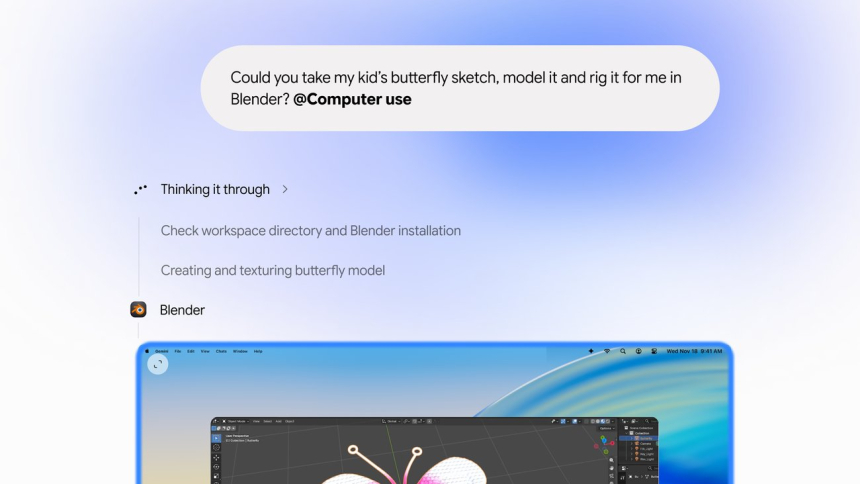
Gemini can now handle Mac applications in the background to complete multi-step tasks involving local files, desktop programs, and web pages. Google announced the Computer Use feature on November 19: users describe what they need, and the assistant clicks, types, and navigates menus and forms while showing its activity in the chat.
The new feature changes Gemini’s role on the desktop: it is no longer limited to drafting a response or summarizing a document, but can move information between different tools and carry out a sequence of actions. Google presents it as a way to handle repetitive tasks that often require dozens of clicks; examples include filling out shipping forms with data extracted from PDFs, preparing presentations, and processing batches of images.
“Just describe what you need, and Gemini handles the clicking, typing, menus, and forms for you.”
— Michael Friedman, Group Product Manager, Gemini App
From a local PDF to a shipping form
One of the most concrete examples is preparing a shipping quote. Gemini can open PDFs saved on the computer, extract weights, dimensions, and addresses, and copy that information into the corresponding fields in a web form. This lets the assistant connect a local source with an online page without requiring users to manually switch between documents.
Google also describes a workflow that combines information from live dashboards and Google Slides: Gemini can collect metrics and screenshots from dashboards in different regions and turn them into a presentation. Europa Press also mentions creating presentations from screenshots and extracted data, as well as comparing products available online.
Creative tasks and selling items are among the other proposed uses. The assistant can apply color adjustments to multiple photos, prepare 3D scenes, or review clothing images saved in a folder, research prices, record details, and prepare listings on resale platforms. Google also cites organizing listings in batches; Engadget gives e-commerce platforms such as eBay as an example.
A separate, supervised window
While Gemini works, the task runs in an isolated background window. The chat provides a live preview so users can follow the clicks and typing. The main screen and cursor remain available, allowing users to continue other activities on their Mac while the agent completes its task.
Google says users decide which applications Gemini can access, can watch every step, and can stop or pause the operation. They can also approve important actions before they are carried out. The Decoder and TechCrunch describe similar controls: following the process in the preview and confirming key actions; The Decoder adds that actions can be approved in advance.
The feature therefore does not mean that Gemini takes exclusive control of the computer while it works. Its activity runs in parallel, with a view visible in the chat and subject to the permissions granted by the user. Engadget notes that access is limited to authorized applications and programs.
Computer Use availability and requirements
Google began rolling out the feature in English and in the United States through the Gemini app for Mac. The company has not said when it will come to other countries or platforms. TechCrunch reports that Google also did not specify a date for expanding availability, while Europa Press’s coverage confirms the geographic and language restrictions.
| Requirement or condition | Details |
|---|---|
| Computer | Mac with Apple Silicon. |
| Operating system | macOS Sequoia 15.0 or later. |
| Account | Personal Google account; user must be 18 or older. |
| Plan | Google AI Plus, Pro, or Ultra. |
| Initial availability | United States, in English, through the Gemini app for Mac. |
The technical and account requirements are listed in Google’s announcement. The company says the app can be downloaded from gemini.google/mac; TechCrunch also links access to a Google AI Plus, Pro, or Ultra subscription.
Google expands its push into agents
The launch follows Google’s announcement earlier that week of an expansion of Tasks in Gemini, a feature built into the app that works in the background on multi-step projects and recurring routines. TechCrunch cites logging in to websites, shopping online, and booking appointments as examples of that feature. Computer Use, by contrast, focuses on interacting with the Mac itself: local files, applications, and the web.
The capability also joins other Gemini features for macOS. Google’s release notes say Antigravity was integrated into the Mac app in October, enabling users to launch coding agents that create and test code in the background. The company had also introduced voice dictation and editing tools in the app’s English-language version in July. Those features have their own availability and requirements, separate from Computer Use.
Other companies already offer tools of this kind. TechCrunch says OpenAI, Anthropic, and Meta had been incorporating agentic capabilities into their desktop apps for some time, and considers Google a late arrival to this launch. The Decoder also mentions OpenAI’s work on Computer Use and its Astra model. None of these comments changes the current conditions for Gemini’s feature: for now, it is available for Mac, in English, and in the United States.
Google has not announced a date for expanding to other markets or systems. For now, access depends on meeting the hardware, macOS version, account, and plan requirements, and on the feature being available in the user’s region.
Sources: TecnoAndroid, europapress.es, The Decoder, Google, Gemini, TechCrunch, Engadget