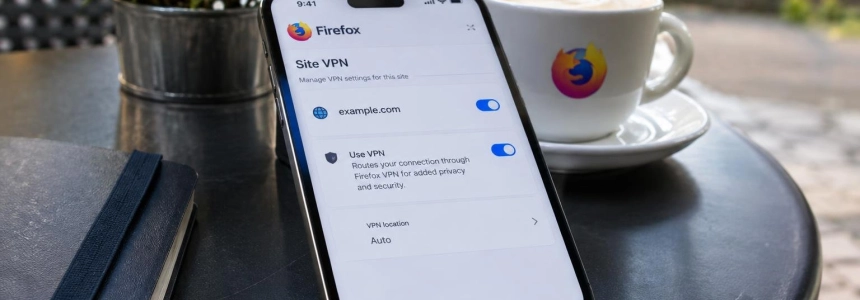
Firefox 161 lets you decide on a site-by-site basis whether to use the browser’s built-in VPN. Mozilla also adds a classic themes section and brings together changes for web developers, Android, and tab restoration in this release.
The VPN no longer applies equally to all sites
Until now, the built-in VPN connection was configured globally; with the change described for Firefox 161, each site can have its own setting. This lets users limit the VPN to pages where they want more privacy or a different location, rather than applying it everywhere. The Firefox Beta notes explain that the control lets users turn it on or off for specific sites.
Firefox 161 expands the browser’s appearance options. The Themes page in the Add-ons Manager now includes a section called Classic themes, with the Proton theme, a Firefox OLED theme, and a selection of solid-color themes.
Another new feature lets users copy the active tab’s address using a keyboard shortcut. No shortcut is assigned by default: users can set one under Customize keyboard shortcuts in Firefox settings. The application menu now also displays tab groups, making them easier to find and reopen.
Imported history and changes on Android
Firefox now preserves visit frequency when importing history from Chrome. As a result, the most-visited pages get priority in address bar suggestions and shortcuts.
Firefox for Android removes the limit on shortcuts on the home page. Mozilla also changes the default shortcuts to make room for the most frequently visited pages; according to the beta notes, more regions will have their own set of preset shortcuts, and non-Google shortcuts will make way for those frequently visited sites.
On some Android devices, performance also improves when rendering pages that apply blur or similar effects behind elements. Linuxiac describes the change as an improvement to backdrop-filter rendering on certain devices.

Fixes for WebRTC, tabs, and desktop
One of the fixes resolves an issue dating back to Firefox 158: some WebRTC services sent H.264 video at a lower resolution than intended. Mozilla also fixes a restoration bug that could cause some tabs to disappear when restarting the browser if the saved session referred to a tab group that no longer existed.
On Windows, the taskbar could remain visible over a full-screen Firefox window after returning from another application. Version 161 fixes this behavior. On macOS 26 and later, it also fixes a crash that could occur when opening Spotlight while the browser had a large collection of bookmarks.
The beta notes also list a fix for Canva Docs: when typing with an input method—for example, for Japanese or Korean—typing could stop after the first character. They also mention a fix for the eyedropper in the developer tools, which displayed incorrect colors after scrolling the page.
CSS gains features, with one exception for colors
Firefox 161 adds support for the CSS random() function, which generates random values within a range and, optionally, with an increment. It can be used wherever mathematical functions are supported in style sheets.
The release also includes CSS Typed Object Model (Typed OM). The API lets scripts read and write CSS values as typed JavaScript objects instead of treating them as text strings. Color values are not yet supported: the Firefox notes cite CSSColorValue as an example of the part that is still pending.
The Firefox Beta announcement adds two other platform features: support for arbitrary substitution functions nested in the primary parameters of var(), attr(), and env(), and custom web formats in the Async Clipboard API. The latter lets pages copy and paste custom data formats between pages from the same origin.
The work on Typed OM has a specific history. Jan Varga of Igalia explained that the feature had been enabled in Firefox Nightly since Firefox 154 and that the team had continued working to close gaps with other implementations. In his post, he said Firefox passed approximately 94% of Typed OM subtests in WPT with the preference enabled, and that he had submitted the intent to ship the feature. The support was part of an investment by the Sovereign Tech Fund; Varga also thanked Emilio Cobos Álvarez and David Shin of Mozilla for their reviews.
“For now I’m just happy that Typed OM is finally close to shipping.”
— Jan Varga, Igalia
Varga noted that Chrome and Safari already offered Typed OM and that Firefox’s implementation did not yet include the color part, which remained behind a separate preference. The Firefox 161 release incorporates the API but retains that limitation.
Availability and differences between the beta notes and the announcement
Linuxiac reports that Mozilla released Firefox 161 on November 23, 2026. According to the outlet, the binaries are available on Mozilla’s download servers; automatic updates for Windows and macOS will arrive over the coming days, and Linux users should see the version in their distribution repositories soon.
The Firefox page provided for this release, however, is for Firefox Beta 161.0beta and is dated November 9, 2026. Its notes clarify that the Beta channel is updated three times a week and that the content changes as features become mature enough to receive feedback and bug reports. They also state that Firefox Beta no longer supports Windows 8.1 or earlier or macOS 10.14 or earlier, and refer users of those systems to Firefox ESR.
This contrast between the release news and the beta notes page leaves unclear in the cited documentation which date corresponds to the publication of the final notes for the stable release. The availability Linuxiac attributes to November 23 and the technical details on the beta page describe the rollout and the features, respectively.