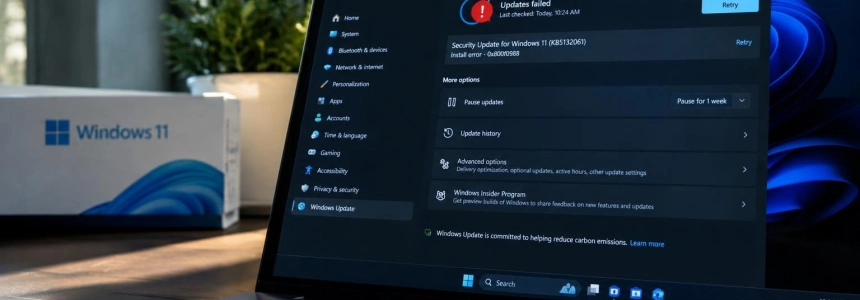
The security update KB5132061 gets stuck during installation on some Windows 11 devices and returns errors such as 0x80070306, 0x800f0989, and 0x800f0993. Microsoft has acknowledged the issue and linked it to devices that installed the unrelated October non-security preview, KB5127936; the company says the fix will arrive automatically within 24 to 48 hours.
The issue appears when installing the November patch
KB5132061 was released on November 10, 2026 as a Windows 11 security update. On affected devices, the installation process does not finish: it may get stuck and retry, or display the error codes 0x80070306, 0x800f0989, or 0x800f0993. SoftZone also collected reports of error 0x800f0922, although Microsoft did not include it among the codes in its notice.
The issue does not affect all users. Microsoft limits the problem to a limited number of devices that installed KB5127936, the non-security preview update released on October 28. According to the company, devices that did not install that preview are not affected.
This distinction helps narrow down an issue that was initially described based on scattered reports. BleepingComputer reports that Microsoft confirmed the reports; Windows support documentation added a known issue about the installation failure on November 11. The page says the fix will be deployed automatically to affected devices connected to the Internet that use Windows Update in Settings.
| Item | Details |
|---|---|
| Security update | KB5132061, released on November 10, 2026 |
| Related preview | KB5127936, released on October 28, 2026 |
| Errors confirmed by Microsoft | 0x80070306, 0x800f0989, and 0x800f0993 |
| Expected time to fix | 24 to 48 hours from November 11, 2026, at 10:00 PT |
The update is distributed for several Windows 11 branches. Microsoft lists builds 26300.9974, 26200.9974, and 26100.9974, corresponding to 26H2, 25H2, and 24H2, respectively. The support page details improvements for versions 25H2 and 26H2 and also includes a reference to 24H2; the installation issue, however, is defined by whether the October preview was installed.
What KB5132061 includes beyond security fixes
The package is part of November's Patch Tuesday and combines the month's security improvements with quality changes. Among them, Microsoft notes an expansion of the data used to select eligible devices for receiving new Secure Boot certificates through Windows Update. The rollout of those certificates is ongoing.
The patch also fixes an issue that could prevent certain USB Audio 1.0 devices from starting and cause them to display code 10 in Device Manager. It also resolves an error when adding a printer published in Active Directory from Settings: the operation could fail with error 87, “The parameter is incorrect.” Microsoft notes that this issue, introduced by the October update, generally does not affect printers that are already installed or printing in general.
For security, the update makes clients offer NTLM message signing by default on non-anonymous connections. Microsoft explains that the change is intended to reduce exposure to NTLM relay attacks and enable auditing of connections that do not use signing. The package also includes daylight saving time rule adjustments for Cuba and changes to PowerShell script signature validation.
In this last case, encoding checks are becoming stricter: some scripts with invalid UTF-8 encoding may no longer pass signature verification even if they were previously accepted. Microsoft recommends reviewing these scripts, saving them with valid UTF-8 encoding and a BOM, and signing them again. The patch also addresses Remote Desktop client connection failures caused by certificate mismatches after the October preview.
Microsoft says not all devices are at risk
“This issue affects a limited number of devices that installed the October 2026 non-security preview update (KB5127936). Devices that did not install the October 2026 non-security preview update are not affected.”
— Microsoft
Microsoft's confirmation clarifies the scope of the issue, but contrasts with SoftZone's initial description. The outlet said the company was investigating the problem and that support documentation still stated Microsoft was unaware of any issues; it also reported a possible explanation involving a conflict with Windows Sandbox. The subsequent documentation update and the confirmation cited by BleepingComputer instead identify the prior installation of KB5127936 as the condition associated with the failure.
The Sandbox theory comes from an individual case reported by SoftZone: the user found a reference in the logs to a file used by that feature and managed to install the patch after disabling it and restarting. However, another user reported a failure despite not having Sandbox enabled. Microsoft does not identify Sandbox as the cause in its notice, so there is no basis for considering it the confirmed source of the issue.
Reports collected before the official confirmation show that repeated attempts do not always resolve the problem. One affected user described an installation loop with errors 0x800f0993, 0x80070306, and 0x800f0989; another said they encountered the issue on four PCs. Someone else needed as many as seven attempts, including one using the offline installer, before completing the update. Other users, by contrast, installed KB5132061 normally or succeeded after restarting and trying again.
The automatic fix replaces temporary workarounds
Microsoft estimates that affected devices will receive the fix within 24 to 48 hours of 10:00 PT on November 11. Once the fix is applied, Windows Update will automatically download and install the November security update. The company says end users do not need to take any action to receive it.
This guidance changes the picture compared with the initial fixes shared by users. SoftZone described disabling Windows Sandbox, downloading the MSU file from the Microsoft Update Catalog, or using Windows Update repair from the recovery options. These are alternatives some affected users tried, not official solutions; even manual installation sometimes required several attempts.
The support page also lists the usual ways to get updates, including Windows Update, the Catalog, and Windows Server Update Services. But for affected devices, Microsoft's announced solution does not require searching for or manually running a package: after receiving the fix, KB5132061 should download and install through Windows Update.
The company asks users to escalate ongoing issues
The announced timeframe is specific, although Microsoft does not provide a different date in these notices for completing the rollout beyond that 24-to-48-hour window. The company asks administrators who continue to receive reports after that period to contact Microsoft Support; its documentation recommends the same for anyone who continues to encounter errors.
The issue joins other Windows update installation problems that BleepingComputer recalls in its coverage. In March, Microsoft withdrew a non-security preview, KB5079391, after error 0x80073712 reports. In May, it fixed installation failures and error 0x800f0922 issues linked to KB5089549, and in June it warned of issues involving errors 0x80073712 or 0x800f0993 on some devices upgraded to Windows 11 24H2 or 25H2.
Microsoft links this issue to devices that installed the KB5127936 preview. If the device remains connected and uses Windows Update, the fix should arrive within the stated timeframe; if the issue persists after 48 hours, the next step recommended by the company is to contact support.
Sources: SoftZone, BleepingComputer, Microsoft Support, Microsoft Learn