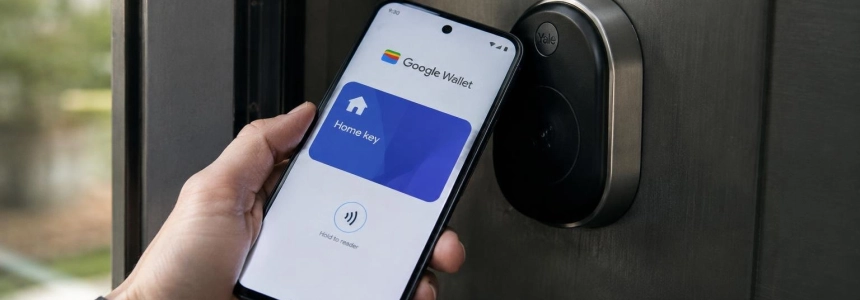
Google Wallet now supports digital home keys: Android users can unlock compatible locks by tapping their phone against the reader or, if both devices support it, as they arrive at the door. The feature is first available in the Google Home public preview, and Google plans to roll it out to everyone over the coming weeks.
Two ways to unlock the door with your phone
The first option, Tap to Unlock using NFC, works by holding the back of an Android phone near the lock’s reader. According to Google, you don’t need to unlock the phone to use it; 9to5Google’s documentation adds that Wallet lets you change the verification requirements and require a screen lock or biometric authentication.
The second option is called Unlock on Approach. If the phone and lock support Ultra-Wideband (UWB), the door can unlock automatically as the user approaches. The feature must be enabled manually in Google Wallet and isn’t available with just any phone or any NFC-compatible lock.
UWB can detect the phone’s position and direction of approach, as well as distinguish whether it is outside the door, explains matter-smarthome. At launch, unlocking on approach works with the Google Pixel 10 Pro series and later models, as well as certain Samsung Galaxy phones with UWB, according to 9to5Google. Google specifically cites the Pixel 10 Pro series and later.
The key is linked to the Google Home household, not to a single lock. This means one Wallet key can work with multiple compatible Aliro locks linked to that home. 9to5Google also notes that the key syncs automatically across compatible Android phones signed in to the same Google Wallet account.
Three lock options at launch
The initial list includes the Aqara U400, Schlage Sense Pro, and Nuki Keypad 2 NFC. The Schlage Sense Pro launches with NFC unlocking; UWB support will arrive later. Google says more locks will be added, but hasn’t specified models or dates.
| Product | Compatibility listed | Details |
|---|---|---|
| Aqara U400 | NFC and UWB | Can unlock as you approach, according to 9to5Google and matter-smarthome. |
| Schlage Sense Pro | NFC at launch | UWB is planned for a later date. |
| Nuki Keypad 2 NFC | NFC | Does not support automatic unlocking on approach using UWB. |
For Nuki, the Keypad 2 NFC must be used with a Matter-compatible Nuki smart lock and a compatible Google hub. matter-smarthome says the integration lets users tap the keypad’s NFC reader with Wallet, but doesn’t add unlocking on approach. The keypad also supports Apple Home Key, Samsung Digital Home Key, unlocking from the Nuki app, fingerprints, and individual access codes: six methods without a traditional physical key.
Compatibility depends on more than just the lock model. Google requires a Google hub with Matter and a Thread Border Router, such as the second-generation Nest Hub, and an Android phone with NFC for Tap to Unlock. This mode requires Android 9 or later. UWB unlocking also requires the phone and lock to support Aliro UWB.
Set up from Google Home
The key is set up in the Google Home app and then saved to Wallet. 9to5Google explains that once setup is complete, Home offers to save the key; it also mentions the path Settings in Home > Google Wallet key. The resulting card displays the Google Home logo and the name of the household.
Google says all household members linked to the same Google Home account can add their own key to their personal Google Wallet. The feature therefore isn’t limited to sharing a single digital card: each household member can add their own to their digital wallet.
For those who can already enable the public preview, the steps are to check compatibility and set it up in Home. Wallet then lets you manage whether unlocking the device is required. If this requirement is enabled, you’ll need to unlock your phone; if it’s disabled, you can simply hold it near the reader, according to Google Wallet Help.
Aliro and Google’s entry into digital access
The integration is based on Aliro, an open standard designed to let phones communicate with compatible smart locks. matter-smarthome says it was developed by the Connectivity Standards Alliance (CSA) and that the standard was published in February 2026. Apple and Samsung had already implemented it, according to the same publication; Google is now adding Wallet to the group.
Google Home already offered some unlocking features; this addition lets users use their phone’s NFC and UWB with compatible locks. Aliro hardware availability remains limited: for now, the list announced for Wallet is limited to the three products named above, with more models expected.
Wear OS watches are not supported at launch, according to Google. The Verge notes that the wording leaves open the possibility of adding them later, but there’s no announced date or confirmation of that support. Wallet Help, meanwhile, describes using digital keys on a phone or wearable for keys issued and managed by property administrators; those instructions don’t confirm that Wear OS already works with the new Google Home keys.
The digital key doesn’t replace the physical one
Google Wallet documentation recommends also carrying the physical key as a safety measure. It also explains that deleting a key from one device doesn’t remove it from other devices: to remove it from multiple devices, you must do so on each one. Factory-resetting or remotely erasing a phone does remove the keys stored on that device, which must then be added again.
Deleting a key from Wallet doesn’t disable it. Only the property administrator can deactivate it, according to Google Help. This distinction applies to digital keys issued and managed by property administrators; for the Google Home feature, Google describes the key as being linked to household members and their associated locks.
If the reader doesn’t respond, Google recommends checking that NFC is turned on, holding the phone near the reader for a few seconds, and trying a different orientation, since the antenna may be at the top or bottom of the device. If the issue continues, it says to contact the property administrator for keys they manage.
The feature is first available in the Google Home public preview, and Google plans to roll it out to everyone over the coming weeks. The company also says more locks are on the way; Wear OS watches are not supported at launch.
Sources: The Verge, Google Wallet Help, 9to5Google, matter-smarthome