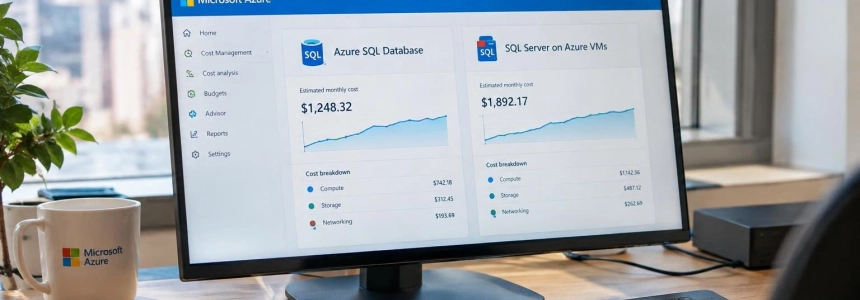
A VM with SQL Server can incur charges even when the database is barely working; Azure SQL Database, by contrast, offers serverless compute that is billed by the second and can be paused. That difference sums up the cost dilemma, but it is not enough to make a choice: licensing, disks, backups, high availability, and the operational work the team takes on also matter.
To compare the two options in 2026, you need to start with a specific workload. Microsoft cautions that its prices vary by region and agreement, and its Azure SQL Database page provides estimates, not final quotes. So the useful comparison is not a universal rate, but a breakdown of what each architecture puts on the bill.
What goes into the bill for each option
Azure SQL Database is a managed service: Microsoft manages the operating system, the SQL Server engine, updates, backups, and built-in high availability. The customer mainly pays for compute and storage; depending on the configuration, there may also be charges for backup storage, long-term retention, or additional redundancy.
Compute can be purchased with DTU, which bundles CPU, memory, and input/output, or with vCore, which lets you adjust those resources separately. With vCore, there is provisioned compute—a fixed capacity billed by the hour—and serverless, intended for databases with intermittent or unpredictable usage. The latter scales compute automatically and bills by the second while it is in use.
With serverless, automatic pausing reduces compute costs to zero while paused; storage charges remain. But an open connection can prevent the database from going to sleep. The SQL & Cloud Lab article points to an SSMS session, the application's connection pools, and health checks as possible causes. If any of these keep the database active, the expected savings may not materialize.
The VM is billed while it is running, whether SQL Server is busy or not. Added to that amount are the SQL Server license—unless you bring a valid license or use a free edition—the operating system, data, and log disks, backups, and, if high availability is required with an Always On group, at least one more VM and its disks.
There is also a less visible operational cost: with a VM, the team handles patching, monitoring, restore testing, and failover planning. Azure SQL Database shifts those platform tasks to Microsoft. The difference does not necessarily appear as a single line item on the bill, but it does change what internal resources each alternative requires.
Cost and capability comparison
| Criterion | Azure SQL Database | SQL Server on an Azure VM |
|---|---|---|
| Compute | DTU or vCore. Serverless bills by the second of use; provisioned compute bills a fixed capacity by the hour. | The VM is billed by the hour while it is running, even if the SQL workload is low. |
| Idle costs | With serverless, costs can drop to storage charges if the database pauses; open connections can prevent this. | The VM continues to incur charges until it is stopped and deallocated. |
| SQL Server license | Included in the service or discounted through Azure Hybrid Benefit with provisioned vCore compute. | Included in some pay-as-you-go images or covered through Azure Hybrid Benefit if requirements are met. |
| Storage | Charged according to the tier and provisioned or allocated storage; the cost depends on the configuration. | You pay for the operating system, data, and log disks. Premium SSD or Ultra disks can increase the total. |
| Backups | Automatic backups with a certain amount of storage included; additional retention and excess usage may incur charges. | The customer configures and pays for Azure Backup or backup storage in Blob. |
| High availability | Built-in high availability; some options, such as zone redundancy in General Purpose, add cost. | May require a second VM, disks, and licenses, depending on the design and applicable license entitlements. |
| Administration | Microsoft manages the operating system, patches, backups, and the service's high availability. | The team manages the operating system and tasks such as patching, monitoring, and recovery testing. |
| Instance control | Fewer instance-level features; the comparison article cites SQL Agent and cross-database queries as limitations. | Control of a full instance, with operating system access and the ability to install software alongside SQL Server. |
| Existing licenses | Azure Hybrid Benefit is available only with the vCore model and provisioned compute; it does not apply to DTU or serverless. | Azure Hybrid Benefit reduces licensing costs, but does not eliminate the base costs for compute, storage, backups, or I/O. |
The table shows why it is not advisable to compare only compute prices. A small VM may seem inexpensive, but that figure does not necessarily include the SQL Server license: Microsoft Learn clarifies that the estimate shown when selecting a VM size includes compute and, where applicable, the operating system license, but not the SQL Server Web, Standard, or Enterprise license. To refine the calculation, you also need to select the SQL Server edition.
Licenses and discounts: the calculation can change
Azure Hybrid Benefit can reduce the license portion for both options, but its conditions and impact are not the same. In Azure SQL Database, it applies only to provisioned vCore. Both the DTU model and serverless are excluded, an important distinction if the idea is to choose serverless specifically to cut costs for databases with irregular activity.
Microsoft says that the benefit for Azure SQL Database can offer savings of 30% or more when SQL Server licenses with Software Assurance are assigned. This is a reference for potential savings, not a guaranteed price for every configuration. The amount depends on the available license and the resources purchased.
On a VM, Azure Hybrid Benefit also requires SQL Server Standard or Enterprise licenses and Software Assurance. It reduces the license assignment cost, but the VM, storage, and backups are still billed. Microsoft recommends this approach for continuous workloads with a known duration and scale; for temporary work or workloads of uncertain duration, it describes pay-as-you-go licensing as a suitable alternative.
There are also free editions for specific use cases. Developer has no license cost and is suitable for development, testing, or proof of concept, but cannot be used in production. Express also has no license fee and can serve light production workloads: Microsoft gives as a reference up to 4 cores, less than 1 GB of memory, and up to 50 GB per database. However, it warns that Express lacks some features needed in production, such as Enterprise-level disaster recovery options.
For predictable workloads, SQL Database offers savings plans based on a commitment to hourly spending for one or three years, and one- or three-year reservations, according to Microsoft's pricing page. The purchase should match the actual consumption pattern: a commitment can lower costs compared with pay-as-you-go, but it does not replace measurement or choosing the right capacity. For VMs, Microsoft's materials highlight right-sizing and shutting down intermittent workloads, rather than comparing final costs between reservations.
When to choose Azure SQL Database
It is a better fit when building a new application, using a single database, or dealing with a workload that fluctuates, and the team prefers not to manage patches, backups, and high availability. If usage is irregular, serverless may be a good candidate: compute is billed by the second and the database can be paused. For many small databases with uneven activity, SQL & Cloud Lab recommends considering an elastic pool.
The condition is that the application must not depend on instance-level features the service does not offer. The comparison cites SQL Agent and cross-database queries as Azure SQL Database limitations; if those capabilities are needed, it suggests considering SQL Managed Instance or a VM. Choosing the managed service, therefore, is not just a billing decision: it also depends on how much of the existing SQL Server environment can be moved without changing its requirements.
Azure SQL Database is also easier to budget for when you want to delegate management of the engine and its platform, although not all costs disappear: storage, long-term backup retention, and certain redundancy options can still affect the total. With serverless, you also need to check that the database actually pauses.
When to choose SQL Server on a VM
A VM is worth considering when you need full control of the instance, access to the operating system, a specific version of SQL Server, or third-party software installed alongside the engine. It also fits applications that require SQL Agent, SSIS, or SSRS on the same server, according to the SQL & Cloud Lab comparison.
That control comes with operational and infrastructure costs: in addition to choosing the VM size and edition, you need to plan disks, backups, and availability. If you shut down the VM, you need to do so correctly: Microsoft notes that stopping it from the operating system is not enough to avoid charges; it must be stopped and deallocated. For workloads that do not run all the time, it also recommends sizing the VM according to actual needs and considering shutdowns during idle periods.
A continuous production workload with Standard or Enterprise licenses and Software Assurance can take advantage of Azure Hybrid Benefit on a VM. Microsoft also notes that an assigned license can cover a passive secondary replica for high availability and another for disaster recovery, subject to the conditions described in its guide. This can reduce the license component of a redundant architecture, although it does not eliminate the cost of the additional infrastructure.
How to build a valid comparison
Before migrating, SQL & Cloud Lab recommends collecting at least two weeks of actual usage from the current server: average and peak CPU, memory, IOPS, and log write throughput. Sizing Azure based on the old hardware rather than its actual utilization can lead to paying for idle capacity. After deployment, it suggests starting with a smaller size and monitoring for a week before scaling up if the metrics warrant it.
With that data, it is worth calculating equivalent scenarios in the Azure pricing calculator: the same workload volume, availability level, and backup policy. In Azure SQL Database, you need to choose between DTU and vCore and, for the latter, between serverless and provisioned compute; for the VM, include the SQL Server edition, machine size, and disks. Then add retention, redundancy, and licenses, and consider who will perform maintenance.
There is no single figure for “Azure SQL versus VM” without those parameters. As a general guide, the managed service usually has an advantage for new or variable applications when serverless pausing works and instance-level features are not required. A VM may be justified by compatibility and control, especially if an existing license and careful sizing offset its additional components. The next step is to price both configurations using the region, agreement, and workload metrics that actually apply to the migration.
Sources: DEV Community, Microsoft Azure, Microsoft Learn, Microsoft Learn