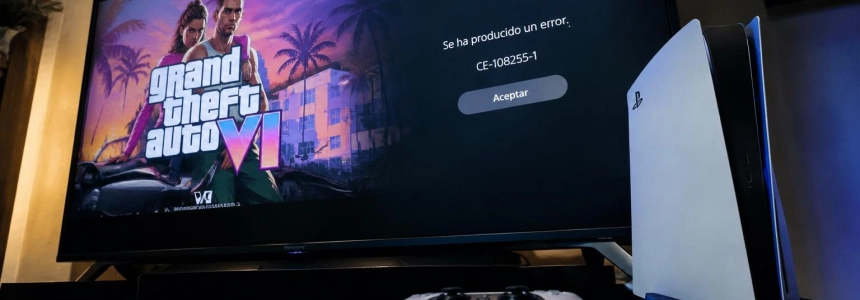
GTA 6 is crashing on some PS5 consoles with error CE-108255-1, according to players describing failures in the prologue and specific missions; in some cases, they say they cannot progress through the story. The code means an error occurred in the game or application, but it does not identify the cause by itself. There is no confirmed fix.
Check whether this matches your case: the game returns to the PS5 home screen and CE-108255-1 appears. Some users describe crashes after playing for a while; others point to the start of the game or moments during a mission. Multiplayer.it has collected reports from Reddit and support forums, while Eurogamer describes cases on PS5 and PS5 Pro.
What to do if CE-108255-1 appears
Note when the crash occurs. Before changing any settings, write down whether it happens when starting GTA 6, during a cutscene, or when repeating a specific action. Some players place the problem in the prologue, while others point to Pipework, an early mission in which a plunger is used. Recording the exact point helps you describe the failure to support; it does not prove that all cases have the same cause.
Check for a game update. This is PlayStation's recommendation for CE-108255-1. On the home screen, highlight GTA 6, press Options, and choose Check for Update (“Check for Update”). Eurogamer lists this path and notes that PlayStation's support page advises updating the game. If no update is available, there is no patch to install using this step.
Check that the installation is complete. Eurogamer recommends checking the download status: highlight GTA 6, press Options, and select Download Status (“Download Status”). The idea is to confirm that installation has finished before trying again. Do not delete the game just because the error appears once; this check is less drastic and does not require reinstalling the data.
Install system updates. Eurogamer's guide includes checking the console software under Settings > System > System Software (“Settings > System > System Software”). Follow this path on your PS5 and check whether an update is available. This step is part of Sony's general recommendations for crashes, but it has not been confirmed to fix the specific GTA 6 issue.
Try restoring licenses. Eurogamer gives the path Settings > Users and Accounts > Other > Restore Licenses (“Settings > Users and Accounts > Other > Restore Licenses”). This is one of the general measures suggested for this type of error. If the crash continues afterward, do not repeat the process expecting a guarantee: several players say the usual measures did not solve the problem for them.
Leave clearing the cache and rebuilding the database for Safe Mode options. Both Eurogamer and Multiplayer.it mention that affected users tried clearing the cache and rebuilding the database, without consistent results. Eurogamer includes them among Sony's general measures, but the available articles do not detail how to enter Safe Mode or the exact steps. Do not improvise a button sequence based on this guide.
Reinstall only if the steps above fail. Deleting and reinstalling GTA 6 is another measure mentioned by Eurogamer. Some players say they have already reinstalled the game—even more than once—without success, so do not treat this as a guaranteed fix. If it is installed on an external drive, Eurogamer suggests trying to move it to the console's internal storage.
Contact the appropriate support team if the error persists. PlayStation describes CE-108255-1 as a game or application error and refers users to its support; reports also indicate that some users have been redirected between PlayStation and Rockstar support. When contacting them, provide the code, your PS5 model, when the crash occurs, and which steps you have already tried. There is no confirmed cause that would allow it to be attributed to a specific component.
What is known about the scope—and what is not
The complaints do not point to a single model. Multiplayer.it mentions PS5 and PS5 Pro; Eurogamer also includes accounts from PS5 Pro owners. GamesRadar+ describes reports on standard, digital, and Slim PS5 models. These are player reports, not confirmation that all those consoles are affected or that there is a common defect.
The accounts do not describe a single pattern either: some users say the game crashes after a while, while others cannot get past a cutscene or a specific section. Eurogamer also reports a case in which other games worked without crashing, but that individual experience cannot rule out a console problem or prove that the issue is exclusive to GTA 6.
Rockstar had not confirmed a fix in the reports from Multiplayer.it and Eurogamer. The latter also notes that the studio had not announced a patch for CE-108255-1. PlayStation's support page provides a generic description and recommends updating the game; it does not explain why the error occurs.
Mistakes to avoid
Do not assume that a repair will fix the game. Some users describe trying to restore licenses, clear the cache, rebuild the database, reinstall the game, and even reset the console without finding a solution. The fact that a measure is listed among possible attempts does not mean it worked in the reported cases.
Also avoid resetting the PS5 as a first step: some players have already tried this, without success according to the accounts collected. Before taking such a drastic step, check for updates and confirm the installation status. If the error continues, contact support and explain what you have done.
Do not pay for a repair based only on the code. Reports have not established whether the cause lies with the game, the system, or a specific hardware configuration. The fact that the error appears on a PS5 is not enough to conclude that the console needs repair; Rockstar and Sony have not communicated a definitive fix either.
If CE-108255-1 appears again, keep track of where in the story it happens and which measures you have tried so you can share them with support. For now, PlayStation's specific recommendation remains to check whether an update for GTA 6 is available.
Sources: Multiplayer.it, Eurogamer.net, GamesRadar+, Notebookcheck, PlayStation Support