Gemini can now click and type on a Mac to complete multi-step tasks across local files, desktop apps, and websites. Google announced the feature on November 19 and is rolling it out in English in the United States, within its Mac app.
The new feature changes the assistant’s role: in addition to responding to instructions, it can perform actions on the computer. Google is positioning it for repetitive work that requires many clicks, from transferring data from documents into forms to preparing presentations based on metric dashboards.
A virtual window for working in the background
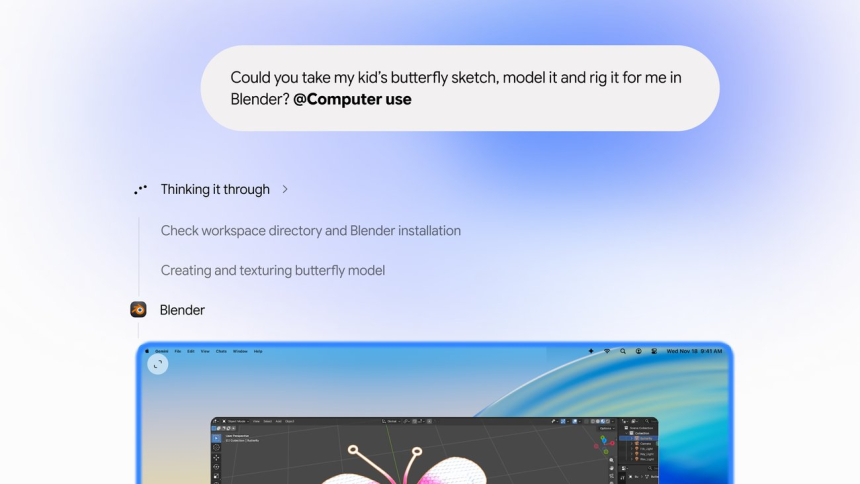
Users describe what they need, and Gemini handles clicks, typing, menus, and forms. The task runs in an isolated or virtual window, with a live preview inside the chat. Meanwhile, the main screen and cursor remain available so the user can continue working.
Google’s help documentation explains how to start a task: open the Gemini app on the Mac, choose «Task» below the chat box, and mention @Computer use along with the instructions. Gemini displays the app while it works; users can expand the view to full screen or click «Stop task» to end the process.
The first time an app is used, Gemini asks whether access should be denied, allowed once, or always authorized. Permanent authorization can be revoked in settings. Users can also define lists of allowed and blocked apps; choosing a permission limited to one step or conversation does not by itself change those settings.
Google says users can follow each step, pause the task, and approve key actions before they are carried out. For sensitive tasks, its documentation says Gemini asks for confirmation before proceeding. The feature therefore does not amount to blanket authorization for all apps: it only controls apps that have been granted permission.
From PDFs and photos to budgets and ads
Google’s examples show the kind of work it aims to automate. Gemini can extract weights, dimensions, and addresses from several PDFs saved on a Mac and use that data to fill out a shipping quote with numerous fields. It can also take metrics and screenshots from active dashboards across different regions and create a presentation in Google Slides.
For creative tasks, the company cites color-correcting a batch of photos and preparing complex 3D scenes in design software. To sell clothing, Gemini can analyze images in a local folder, research prices, record details for each item, and prepare listings on resale platforms.
The support guide adds other examples: finding receipts in the Downloads folder and completing an expense report; importing travel photos into Lightroom, applying a lighting filter, removing background objects, and exporting them as 4K PNGs; or finding a seasonal image in a browser and setting it as the desktop wallpaper.
These tasks can span multiple apps. Google explains that Gemini can extract information from one program and use it in another, for example, turning meeting notes into an email draft. According to examples reported by TechCrunch, automation can also organize files into folders based on user-specified criteria, repeat an operation across a set of files, or create presentations using information from online dashboards.
Limited availability and account requirements
The initial rollout is limited to English and the United States. Google requires a personal Google account, users to be at least 18 years old, and a Gemini AI Ultra, Google AI Pro, or Google AI Plus subscription. It is not available for work or school accounts, according to the support documentation.
The app requires an Apple Silicon Mac running macOS Sequoia 15.0 or later. It can be downloaded from gemini.google/mac. Google has not said when it will arrive in other languages, countries, or platforms; TechCrunch notes that the company did not announce a timeline for expanding availability.
MacRumors reports that compatible plans start at $4.99 per month. Google’s help documentation recommends Gemini Hydrogen 4 or later models for higher-quality responses, but does not identify a specific model as the engine behind the computer-control feature.
Broad permissions bring risks in apps, too
The ability to act in local apps goes beyond interacting with web pages. Google warns that Gemini may have access to accounts that are signed in and active sessions within native apps, and that untrusted content displayed on screen could manipulate the agent into taking action in other authorized apps.
The company also notes that some actions may be irreversible, even though the system attempts to create temporary backups before working. These copies are kept for 24 hours or until the next instruction, but they cannot always be created, and some apps may prevent them because of their own settings or permissions. The on-demand backup option can be enabled in the «Computer use» settings.
The documentation also warns that permissions for code editors, text editors, or development tools may allow shell commands to be run or broader changes to the file system. Gemini could also read or interact with authentication requests or multifactor authentication codes visible in desktop or messaging apps. Google advises users to keep in mind that some automations may conflict with the terms of service of third-party apps.
To control access, users can block an app from the «Blocked apps» list or add it to «Allowed apps» to let it be used without asking for confirmation in the chat. Google’s help documentation explains that, in a conversation, «Don’t allow» and «Allow once» apply to that step or chat; «Always allow» adds the app to the allowed list.
Google’s move and the Apple context
TechCrunch places the launch after Google expanded Gemini’s «Tasks» feature, which lets the assistant work as an agent on tasks such as signing in to websites, shopping online, or booking appointments. It also notes that the company recently began accepting early testers for its «CC» agent, introduced in September and designed to help families organize emails, calendars, chats, and tasks.
The same outlet observes that OpenAI, Anthropic, and Meta already offered agentic features in their desktop apps. Google is now presenting computer control as another way to perform multi-step tasks, this time through Mac apps and files as well as the web.
The launch coincides with permission changes Apple is preparing for macOS 27.3, according to MacRumors. Apple will warn about the risks of granting unrestricted access and let users limit it to specific apps and folders, request authorization each time, and display an indicator when one app controls another. Users who have already granted permissions will not have to grant them again after the update, and will not see the new explanatory screens Apple is adding.
For now, Gemini desktop use remains restricted to eligible personal accounts in the United States and in English. Google has not announced a date for extending the feature beyond those limits.
Sources: WWWhat's new, MacRumors, Google, Google Gemini Apps Help, TechCrunch