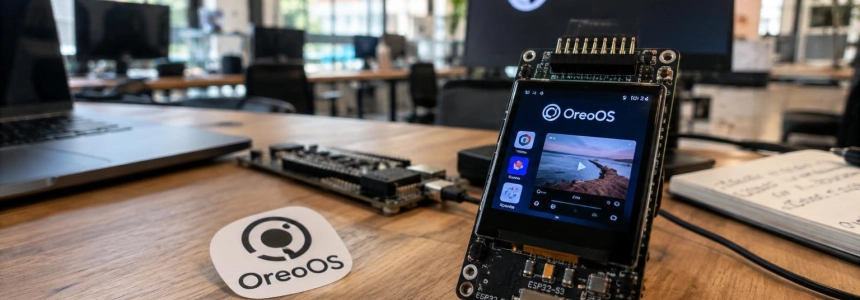
A 16 MB ESP32-S3 board can run OreoOS, a MicroPython operating system designed for a conference badge with a color display, games, a document reader, and WiFi connectivity. The open project, published on GitHub by Elixpo, includes the firmware and applications, as well as a reference hardware design and tools for installing software from a computer.
The Oreo badge is not conceived as a generic development board with an interface added afterward. Its system integrates a launcher, an on-device app store, physical controls, wireless file transfer, and OTA updates. It also incorporates RV565, a video pipeline that uses DMA on the display; a paper published on arXiv describes playback at 24 frames per second on an ESP32-S3.
An open badge, not just a conference tag
The GitHub repository presents Oreo as a panda-themed wearable badge running an operating system. The project combines a hardware board and a software environment built around MicroPython, with applications that can be modified or expanded. The display is a 2-inch IPS panel with a resolution of 320 × 240 pixels and RGB565 color. The repository lists its refresh rate as 33 FPS for the interface.
The project’s technical specifications identify the module as an ESP32-S3-DevKitC-1-N16R8: it has 16 MB of flash and 8 MB of PSRAM, 802.11 b/g/n WiFi connectivity, and Bluetooth Low Energy 5.0. The reference board adds an MPU-6050 six-degree-of-freedom motion sensor, a TSOP38238 infrared receiver, eight buttons, four corner LEDs, and a WS2812 status LED. Power is designed for an 18650 battery and USB-C charging.
The technical document describes a reference design on a breadboard, not a specification for a finished commercial product. Its version is revision A, dated May 15, 2026, and is identified as compatible with OreoOS v1.3 or later.
The display uses an ST7789 controller and a four-wire SPI connection at 40 MHz. The document estimates the size of a full RGB565 framebuffer at 153,600 bytes and the transfer time for a frame at about 30.7 ms. The backlight is PWM-controlled. These figures are for the reference design: the repository also notes that the badge can display a 33 FPS interface.
MicroPython applications and a local store
Applications are Python classes built on the OreoOS SDK. According to the repository documentation, each implements three lifecycle methods and is organized in its own folder under apps/. The project templates provide a starting point; deployment copies the applications to the board, and their icons appear in the launcher.
The catalog separates included applications from optional extras. Those in apps_market/ do not appear in the launcher drawer until the user installs them from the App Market tile. The initial catalog described on GitHub contains Color Picker and Elixpo Pet; an installed app can be uninstalled from the same place and added again without downloading it a second time. Developers can contribute a folder containing main.py, manifest.json, __init__.py, and resources.
The repository’s list includes utilities for checking badge information and GitHub commits, a weather app, a gallery, a Markdown reader, games, settings, storage, infrared missions, and Doom. OreoOS groups WiFi and Bluetooth under Settings instead of giving them their own icons in the drawer. It also offers a notification panel that opens with the C button: from there, users can access the radios, brightness, time synchronization, and transfer or update notifications.
The number of applications varies across the project’s own pages. The GitHub README mentions 14 default applications; the technical specifications count 13 applications, and the OreoOS website advertises 20 in-house applications. The site lists Badge, Flappy Oreo, Gallery, Snake, IR Quest, and Reader, among others, and says the on-device store retrieves applications from GitHub at runtime.
The SDK includes functions for drawing shapes and text, displaying sprites, loading fonts, caching data, synchronizing the clock, and checking storage usage. The reader opens Markdown and text files that have been copied to the documents folder or included in the application. The repository says it detects new files in the picker by polling every 200 ms, without restarting the system.
WiFi, files, and updates
OreoOS uses MicroPython’s standard networking stack, with custom wrappers for managing configuration and limiting power consumption. GitHub documents WiFi with a maximum transmission power of 11 dBm and a power-saving mode. The badge can check the weather, retrieve GitHub information, and look for updates. A section of the repository also describes Bluetooth transfers: the board advertises as Oreo and provides a GATT service for receiving an image of up to 250 KB or a compressed text document.
Wireless transfer is described differently on the OreoOS website. There, it is presented as a WiFi-based feature, with approval on the badge, a six-digit code, a signal exchange, and image conversion to RGB565 in the browser. The same page says Bluetooth will return for proximity features, such as infrared missions and gestures between badges. Therefore, the project’s pages do not provide a consistent description of the available wireless features.
The system includes OTA updates that check GitHub Releases. According to the README, patches of up to 80 KB are installed automatically; larger updates wait for user confirmation. Files are validated with SHA-256 and swapped atomically on the next boot. The technical documentation puts the update module at about 350 lines of code, within a system estimated to contain fewer than 10,000 lines of Python.
To get started, GitHub says the computer tools require Python 3.9 or later and work on Linux, macOS, or Windows through WSL. The badge firmware uses MicroPython 1.28. The documented procedure clones the repository, installs the OreoOS dependencies, and runs tools/deploy.py with the board’s port. Unit tests can also be run without hardware: they cover color helper functions and configuration reading, but do not run the applications. The repository notes that there is not yet a desktop simulator.
RV565 and video playback
Video playback is one of the features that sets the project apart. The OreoOS website advertises native video at 24 FPS, while the paper on RV565 explains how decoding and display transfer are organized to achieve that rate on an ESP32-S3. The academic paper, titled «RV565: Cross-Layer Co-Design for Frame-Independent Video Playback on MicroPython-Class ESP32-S3 Systems», studies two ten-second clips from an openly licensed film.
The paper compares a serial path—decompressing and then scaling each frame into internal-memory strips while transferring the image via DMA—with a dual-core pipeline. The first meets the 41.7 ms deadline in the lighter window, but drops all 7,200 frames in the more demanding one. RV565 decompresses the next frame on the second core while the current one is being transferred and, according to the authors, sustains 24 FPS with no dropped frames in both windows, with 10.3 ms of headroom.
The document adds that frame time is limited by the transfer to the display, which reaches 98.1% of the theoretical limit of the 40 MHz connection. It also evaluates decompression running in the firmware within OreoOS: it reaches 12.2 FPS in that configuration. The analysis attributes the 80.4 ms per-frame time to serial file-system reads, data placement in external memory, and blocking presentation; interpreter overhead is 0.8 ms.
The paper also argues that decompressing independent frames scales linearly with the compressed length of the container. In the measurements, a model fitted to one window predicts the other with a difference of less than 0.04 ms. The paper also compares Deflate compression of RGB565 frames with an XOR-difference technique: the shared Deflate stream barely changes the size, by at most 1.1%, while XOR differences would save between 46% and 80%.
Power consumption, limitations, and next steps
The technical specifications estimate typical power consumption at 95 mA with the display on and WiFi connected while idle; during WiFi transmission at the 11 dBm limit, the peak reaches 130 mA. With Bluetooth advertising at 500 ms intervals, average consumption is estimated at 65 mA. In light sleep, with the display and WiFi off, it is 22 mA. The ESP32-S3’s deep-sleep mode consumes 25 µA, but the specifications warn that OreoOS does not yet use it.
Estimated battery life for a 3,000 mAh 18650 cell is about 14 hours with active use and three weeks on standby with the backlight off. The document also notes a specific electrical requirement: 2,000 µF of capacitance is needed on the 3.3 V rail to absorb WiFi transmission peaks when powered through the AMS1117 regulator.
Among the planned future features, the technical specifications reserve two TTP223 touch surfaces for a v2 revision. Firmware v1 does not read them; waking the system depends on the buttons. The project website lists the restoration of Bluetooth proximity features as upcoming. The page mentions synchronization gestures, notifications between badges, and support for IR missions as intended uses, but does not set a date for their arrival.
OreoOS therefore combines a modifiable MicroPython system with a board whose electrical and mechanical details are documented. The repository lets users test helper functions without hardware, but running the applications requires an ESP32-S3 badge; the technical specifications leave touch surfaces for a later revision, and the project page lists Bluetooth proximity features as still pending.