Bootstrap is a toolkit, which is developed by the Twitter team. This actually helps you to develop web applications much faster.Bootstrap contains CSS and Javascript files using which you can enrich your web page with Grids, Layouts, Typography, Tables, Forms, Navigation, Alerts etc,. This avoids cross browser compatibility problem. This time I am aiming to explain how to design a template of the basic fluid blog for different resolutions and devices like iPad and iPhone.
Bootstrap CSS
Just include two CSS file bootstrap.css and bootstrap-responsive.css. You can use github url too http://twitter.github.com/bootstrap/assets/css/bootstrap.css
  Page Title


  // Webpage layout design.
Bootstrap JavaScript
Include the following JavaScript files and Place them at the end of the document.this will make the page load faster.
Download bootstrap asserts Click Here
Grids
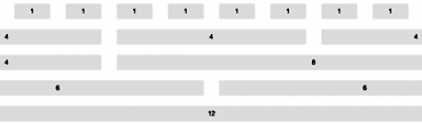
This is the Grid System using Twitter Bootstrap, it supports 940px wide 12 column Grids. The span1 class has a width of 40px.
Layout
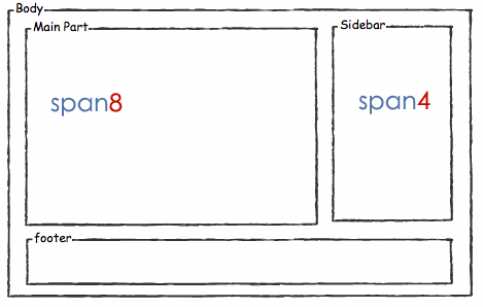
The page container div is divided into two parts consisting of one main areaspan8 for articles and a sidebar span4 for other information. Here I have appliedrow-fluid class.This is for responsive design and multiple resolutions for devices.It makes auto re-sizing of the divs and images easily possible .
// Main Part// Sidebar Part
The above code layout wireframe.
Main Part
Here the articles feed list contains title, description and image. Here btn is the class of the read more button.
// Main Part// Articles Loop// Articles Loop End